


There are millions of people in Madhya Pradesh who work as daily wage labourers, construction workers, street vendors, domestic helpers, and farm labourers.
But most of them do not get any Provident Fund, insurance, or pension from an employer. If they meet with an accident, fall sick, or pass away, their family is often left with no financial support.
The Sambal Card was created to close this gap. It is a state government scheme that gives unorganised workers in Madhya Pradesh a form of identity and social security, backed by direct cash support during accidents, death, pregnancy, and other difficult times. The scheme was later upgraded to Sambal 2.0, which added more worker categories and made the entire process digital.
In this detailed article, we will learn what the Sambal Card is, its benefits and eligibility, what Sambal 2.0 is, how to register for the Sambal Card, and how to do e-KYC and download the Sambal Card. So, let us start the article.
What Is Sambal Card?
The Sambal Card is an identity card given to unorganised sector workers in Madhya Pradesh (MP). It is part of the Mukhyamantri Jan Kalyan (Sambal) Yojana, a welfare scheme run by the state Labour Department.
Sambal Card can be registered by workers such as daily wage labourers, construction workers, street vendors, domestic helpers, farm labourers, drivers, and similar informal workers.
Once a worker is registered, the card connects them to several welfare benefits from the state government. These include financial support after an accident or death, help during pregnancy, school scholarships for children, cheaper electricity bills, and free medical treatment.
The scheme is meant for workers who do not already get social security benefits such as Provident Fund (PF) or Employee State Insurance (ESIC).
Background of the Scheme
The Madhya Pradesh government started this scheme on 1 April 2018 as the Mukhyamantri Jan Kalyan Sambal Yojana. Its main goal was to give economic protection to workers in the unorganised sector who had no other social security cover.
On 5 April 2022, the state government relaunched the scheme with more benefits and simpler rules, and it is now commonly called Sambal 2.0.
The relaunch added new worker categories and made the online process smoother. The scheme is managed by the Asangathit Shahri Tatha Gramin Karmakar Mandal (Unorganised Urban and Rural Workers Welfare Board) under the Labour Department, Madhya Pradesh.
Sambal 2.0 MP
Sambal 2.0 is not a new or separate scheme. It is the upgraded version of the original 2018 Mukhyamantri Jan Kalyan Sambal Yojana.
The state government, then led by Chief Minister Shivraj Singh Chouhan, relaunched the scheme on 5 April 2022 after reviewing complaints and gaps in the first version. The goal of Sambal 2.0 was to widen who could join the scheme, remove old errors, and make the process fully online and easier to track.
On 16 May 2022, soon after the relaunch, the state government transferred Rs. 573.39 crore directly into the bank accounts of labour families across all districts of Madhya Pradesh under the scheme. This transfer showed the government’s move toward Direct Benefit Transfer (DBT) instead of manual, office-based disbursal.
Key Changes of Sambal 2.0
- New worker categories added: Lakhs of tendu leaf (tendu patta) collectors were formally added as unorganised workers, making them eligible for the scheme for the first time.
- Re-registration for rejected workers: Workers who were wrongly marked ineligible under the old Sambal scheme were allowed to apply afresh under Sambal 2.0.
- End-to-end online workflow: The revamped portal handles registration, verification, and approval digitally, cutting down paperwork and manual delays.
- Appeal and grace options: Beneficiaries who are rejected can file an appeal. There is also a separate ‘Anugrah’ (grace/ex-gratia) application and appeal option for claims related to death, disability, or accident assistance.
- MIS dashboards: The portal offers Management Information System (MIS) dashboards at the district, village, and Gram Panchayat/ward level, so officials can track registrations and pending applications area-wise.
- Beneficiary self-check: Any registered worker can check their own record directly using their Sambal or Samagra Member ID, without depending on an office visit.
Note: These points are confirmed on the official Sambal 2.0 information page maintained by the Damoh district administration (a National Informatics Centre government website), which describes the portal as built to simplify the scheme and keep the process transparent.
The Ex-Gratia Assistance Structure Under Sambal 2.0
The compensation part of the scheme is officially called the Anugrah Sahayata Yojana (ex-gratia assistance scheme). It covers the same core payouts described earlier in this guide: funeral assistance, general death assistance, accidental death assistance, permanent disability assistance, and partial disability assistance.
Maternity assistance for women workers who cannot rest properly around childbirth is paid separately, split between a pre-delivery and a post-delivery instalment.
A worker only qualifies for these ex-gratia payouts if they do not already receive social security benefits such as Provident Fund (PF), Employees’ State Insurance (ESIC), or gratuity from an employer. This condition has stayed the same from the original 2018 scheme through to Sambal 2.0.
Recent Updates Under Sambal 2.0
The scheme continues to see large, periodic fund transfers under the current government led by Chief Minister Mohan Yadav. On 28 March 2026, the state government transferred about Rs. 505 crores to 32,162 worker families in a single click, using the same DBT model introduced under Sambal 2.0. This shows that the scheme is still active and continues to expand its reach years after the 2022 relaunch.
Since Sambal 2.0 is a running government scheme, its rules, dashboards, and fund transfer schedules can be updated at any time. Workers should keep checking the official portal, sambal.mp.gov.in, for the latest circulars and payment announcements rather than relying only on older news reports.
Also Read – MP Bhulekh
Samagra ID and Its Role in the Sambal Card
The Samagra ID is a separate identification number given by the Madhya Pradesh government to every family and individual in the state. It has two parts: an 8-digit Family ID for the household and a 9-digit Member ID for each person in that family.
A valid Samagra ID is compulsory for Sambal Card registration. The Sambal portal uses this ID to pull up a person’s existing family and personal records, which saves time during the application.
Anyone who does not yet have a Samagra ID needs to apply for one first at samagra.gov.in before applying for the Sambal Card.
Sambal Card Eligibility Conditions
The following conditions decide whether a person can register for the Sambal Card. These are based on the official scheme rules listed on the state CM Helpline scheme dashboard.
| Condition | Requirement |
| Residence | Must be a permanent resident of Madhya Pradesh |
| Age | Between 18 and 59 years |
| Work type | Must work in the unorganised sector (daily wage worker, construction worker, street vendor, domestic worker, driver, farm labourer, and similar jobs) |
| Other social security | Should not already have PF, ESIC, or gratuity cover |
| Land holding | The worker or spouse should not own more than 1 hectare of irrigated farmland |
| Government job | Should not be a government employee |
| Income tax | Should not be an income tax payer |
| Samagra ID | Must have a valid Samagra ID (Family ID and Member ID) |
Note: A few private websites mention an upper age limit of 60 years instead of 59. Since this detail can change, it is best to confirm the exact age limit on the official Sambal portal before applying.
Documents Needed for Registration on Sambal Portal
- Samagra ID (Family ID and Member ID)
- Aadhaar card and it must linked to an active mobile number for OTP verification
- Passport-size photograph
- Bank account details (account number and IFSC code) for Direct Benefit Transfer
- Proof of work or occupation, such as a job description or work location
- Residence proof showing the applicant lives in Madhya Pradesh
- Income certificate, if asked for during verification
How to Register for the Sambal Card Online?
First of all, registration is free of cost on Sambal Portal. You have to just follow these simple steps on the official portal:
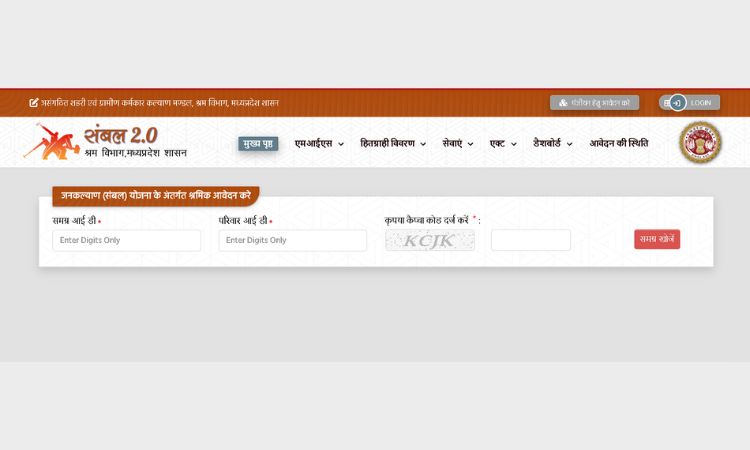
Step 1: Open the official website sambal.mp.gov.in.
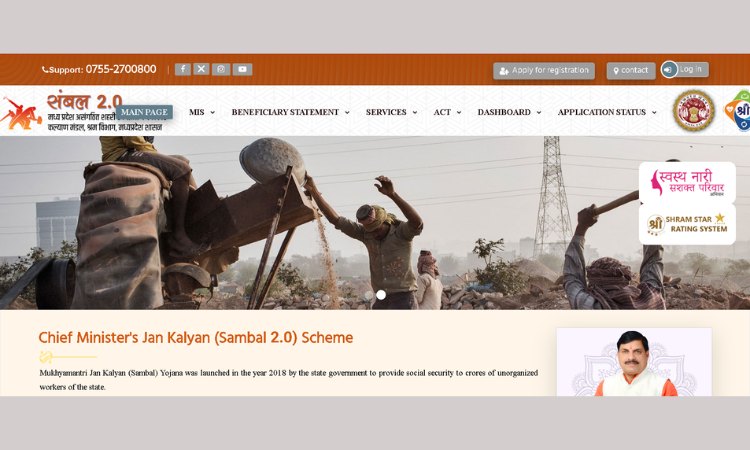
Step 2: Go to the menu and click on ‘Apply for Registration’ (Panjiyan Hetu Aavedan Karen).
Step 3: Enter the Samagra ID and Family ID, then click ‘Search Samagra’ (Samagra Khojen).
Step 4: Check that your family details appear correctly on screen.
Step 5: Fill in worker details such as type of work, education level, employment sector, job type, and mobile number.
Step 6: Complete e-KYC verification using Aadhaar and the OTP sent to your mobile.
Step 7: Tick the agreement checkboxes after reading them.
Step 8: Click ‘Save Application’ to submit the form.
Step 9: Note down the application number shown on screen. Keep it safe for future reference.
Step 10: Visit your Gram Panchayat (rural areas) or ward/municipal office (urban areas) with the application receipt for local verification. The Sarpanch and Secretary, or the ward officer, will sign and confirm it.
Note: Anyone who cannot apply online can also visit the nearest Common Service Centre (CSC) or MP Online kiosk and get help with the registration.
How to Check Sambal Card Application Status?
After applying the Sambal Card, you can easily check its status online through the official Sambal 2.0 portal. You can know whether your application is under review, approved, or rejected without visiting any government office.
Step 1: Visit sambal.mp.gov.in.
Step 2: Click on ‘Application Status’ from the menu.
Step 3: Select ‘Check Sambal Application Status’.
Step 4: Enter the Samagra ID and application number.
Step 5: Fill in the captcha code and click ‘Search’.
Step 6: The current status, such as under review, approved, or rejected, will appear on the screen.
How to Complete Sambal 2.0 e-KYC Online in 2026? (Step-by-Step Guide)
If you want to receive government scheme benefits without any interruption, then you have to complete your Sambal 2.0 e-KYC. Here are simple steps to do online e-KYC.
You can complete it online from home or visit your nearest MP Online Kiosk or CSC (Common Service Centre).
Step 1: Visit the Official website
Step 2: On the Homepage, find and click on the e-KYC Option
Step 3: Enter Your Samagra ID or Sambal Registration ID
Step 4: Enter Your Aadhaar Number
Step 5: An OPT will come to the mobile number linked to Aadhaar; enter the OTP to verify your details.
Step 6: Check Your Personal Details, such as name, address, and Aadhaar information. Make sure all the dtails is correct.
Step 7: If everything is correct, click on the Submit or Confirm button to complete the process.
How to Download Sambal Card Online? (Step-by-Step Guide)
If your Sambal Card is approved you can easily download it. You can easily print your Sambal card through the Sambal 2.0 portal. Just follow these simple steps:
Step 1: Visit the Official Sambal 2.0 Portal
Step 2: On the homepage, find and click on the “Beneficiary Details”
Step 3: Then Enter your 9-digit Sambal ID or Samagra Member ID in the required field.
Step 4: After entering the ID, click the “View Details” button.
Step 5: If your Sambal Card has been approved, you will see the card status along with the option to download or print it.
Step 6: Click on “Print Sambal Card”or“Download” to save the card as a PDF.
Things to Check After Downloading the Sambal Card
Before using your Sambal card, make sure all the details are correct:
- Beneficiary name
- Sambal Registration Number
- Samagra ID
- Aadhaar-linked information (if applicable)
- QR Code (if available)
- Card status and issue details
Checking the Beneficiary List by Gram Panchayat
The Sambal portal also lets anyone check the list of registered workers for a specific Gram Panchayat, without logging in.
Step 1: Visit the Sambal Card list page on sambal.mp.gov.in.
Step 2: Select the district and then the local body (Gram Panchayat, Nagar Palika, and so on).
Step 3: Enter the captcha and click ‘View Report’.
Step 4: The list of registered beneficiaries for that Gram Panchayat will be displayed.
Linking Aadhaar with the Sambal or Samagra ID
Linking Aadhaar to the Samagra or Sambal record, sometimes called Aadhaar seeding. It helps in confirming a worker’s identity and keeps benefit payments running smoothly through Direct Benefit Transfer.
You can easily link Aadhaar with the Sambal ID. This can be done from the e-KYC section of the Sambal portal by entering the Aadhaar number and verifying it with an OTP.
If any worker’s Aadhaar is not linked, they may face delays in receiving payments, so it is worth checking this status from time to time.
Benefits Under the Sambal Card
The table below lists the main financial and welfare benefits under the scheme, based on figures published on the Madhya Pradesh government’s CM Helpline scheme dashboard.
| Type of Support | Amount | When It Is Paid |
| Accidental death | Rs. 4,00,000 | If the worker dies in an accident |
| Normal death | Rs. 2,00,000 | If the worker dies of natural causes |
| Permanent disability | Rs. 2,00,000 | If an accident causes full permanent disability |
| Partial permanent disability | Rs. 1,00,000 | If an accident causes partial permanent disability |
| Funeral assistance | Rs. 5,000 | Paid at once, right after death, to cover last rites |
| Maternity assistance | Rs. 4,000 before delivery + Rs. 12,000 after delivery | For pregnant women workers |
| Scholarships | Rs. 500 to Rs. 5,000 a year | For children of registered workers, based on class/course |
| Electricity bill relief | Fixed low monthly bill (around Rs. 200) | For domestic power connection of the worker’s house |
| Health cover | Free treatment | Through linkage with Ayushman Bharat / state health scheme |
Besides the amounts above, registered workers can also get access to skill training and job-oriented courses through the MP Skill Development Mission, along with priority in some state employment programmes.
All cash benefits are paid directly into the worker’s bank account through Direct Benefit Transfer (DBT), so there is no need to visit an office to collect money in person.
Note: A few non-government websites list slightly different figures, such as Rs. 5 lakhs for accidental death or Rs. 60,000 for normal death. The amounts in the table above come from the official state scheme dashboard and should be treated as the more reliable figures.
Since welfare scheme amounts can be revised by the government, it is always best to confirm current figures on the official portal before relying on them.
Difference Between Sambal Card and e-Shram Card
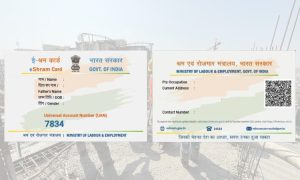
Most people often get confused between the Sambal and the e-Shram Card. Sambal card is run by the state; on the other hand, e-shram is run by the Central Government. Both are meant for unorganized workers and serve different purposes.
- Sambal Card: It is run by the Madhya Pradesh state government. Linked to the Samagra ID. Gives state-specific benefits such as MP electricity bill relief and MP scholarships.
- e-Shram Card: It is run by the Ministry of Labour and Employment, Government of India. E-shram creates a national database of unorganized workers and is meant to work across all states.
Note: Many workers in Madhya Pradesh register for both cards, since they cover different benefits. Holding one does not automatically cancel the need for the other.
Common Problems and How to Solve Them
- Application stuck at ‘pending’: You should visit the Gram Panchayat or ward office for local verification, since many applications wait on a local officer’s approval.
- OTP not received: check that the mobile number is correctly linked to Aadhaar, then retry after some time.
- Card not downloading: check the internet connection, allow pop-ups on the browser, and try again; if it still fails, visit the nearest CSC or Gram Panchayat for help.
- Wrong details on the card: request a correction through the Samagra portal or by visiting the local Samagra/Gram Panchayat office with supporting documents.
Sambal Portal MP – Helpline and Contact Details
For questions about registration, status, or benefits, workers can contact the Madhya Pradesh Labour Welfare Board or the Sambal helpline through the official portal, sambal.mp.gov.in.
The website also lists phone numbers and email addresses under its contact or helpline section, along with a separate complaint link for insurance-related issues.
| Particulars | Details |
| Official Portal | Sambal.mp.gov.in |
| Helpline Number | 0755-2573036 |
| Technical Support | 0755-6720200 |
| Email ID | [email protected] |
| Office | Madhya Pradesh Unorganized Urban and Rural Workers Welfare Board |
| Office Address | 82, Harshvardhan Nagar, Near Mazar, Bhopal, Madhya Pradesh |
Conclusion
Overall, the Sambal Card is the most important welfare initiative by the Madhya Pradesh Government for the unorganised workers. It helps eligible workers access financial assistance, accident insurance, maternity benefits, scholarships for children, electricity bill relief, and other government support through a single platform.
After the launch of Sambal 2.O the registration process has become more transparent, faster, and easier to complete online.
If you are an eligible worker, make sure you complete your Sambal Card registration, finish your e-KYC, and link your Aadhaar with your Samagra ID. Also, make sure your details are updated; it will help you receive benefits without any delay.
Frequently Asked Questions
Q1. What is the Sambal Card used for?
Ans. It identifies a person as a registered unorganised worker in Madhya Pradesh and gives them access to welfare benefits like accident support, maternity aid, scholarships, and electricity bill relief.
Q2. Is Samagra ID compulsory for the Sambal Card?
Ans. Yes. A valid Samagra ID and Family ID are required before applying for Sambal Card registration.
Q3. Is there any fee to register for the Sambal Card?
Ans. No, registration on the official portal is free. A small service charge may apply only if the application is filed through an MP Online or CSC kiosk.
Q4. How can I check my Sambal Card status?
Ans. Visit sambal.mp.gov.in, open ‘Application Status’, and enter the Samagra ID with the application number to see the current status.
Q5. How much money is given for accidental death under this scheme?
Ans. According to the official state scheme dashboard, Rs. 4,00,000 is given to the family in case of accidental death of a registered worker.
Q6. Can I apply for the Sambal Card without visiting any office?
Ans. The online form can be filled from home, but most applications still need a local verification step at the Gram Panchayat or municipal office before final approval.
Q7. Does the Sambal Card need to be renewed every year?
Ans. No separate renewal is generally needed. However, workers should keep their Samagra ID and personal details updated to avoid interruptions in benefits.
Q8. What is the difference between the Sambal Card and the e-Shram Card?
The Sambal Card is a Madhya Pradesh state scheme linked to the Samagra ID, while the e-Shram Card is a central government scheme for unorganised workers across India. Many workers hold both.