


e-Shram card is a boon for the daily wage labourer. If you are a domestic help, street vendor, construction worker, farm labourer, or gig and platform worker (like a delivery rider or cab driver), then an e-Shram card is a must-have document for you.
It is one of the biggest initiatives launched by the Government of India for the people working in the unorganised sector. This card is completely free, and it takes a few minutes to get. E shram card connects you to social security schemes such as accident insurance and pension.
In this detailed article, we will learn what an e-sharm card is, who can apply for it, what documents are needed, how to register step by step, and how to check your card status. So, let us start this blog.
What is e-Shram Portal?
e-Shram (eshram.gov.in) is the National Database of Unorganised Workers (NDUW). This portal is created by the Ministry of Labour & Employment, Government of India.
It is the first national-level database built specifically for the workers of the unorganised sector, like migrant workers, construction workers, street vendors, domestic workers, agricultural labourers, and gig or platform workers such as food delivery and cab-aggregator partners.
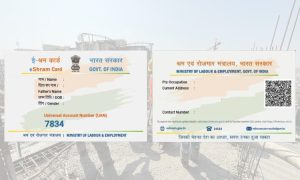
The portal collects and stores basic worker details such as name, address, occupation, education level, skill type, and family information, and links them with Aadhaar. Once a worker registers, they get a permanent 12-digit number called the Universal Account Number (UAN), along with an e-Shram card that carries this number.
In short: e-Shram is a free identity and data system that helps the government know who unorganised workers are, where they live and work, and which welfare schemes they should be able to access.
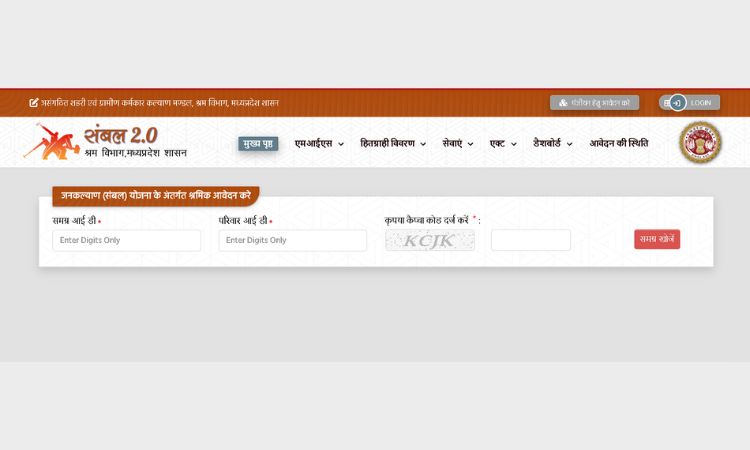
Also Read – Sambal Card MP
Why Was e-Shram Launched?
Before e-Shram, India had no single, updated record of workers in the unorganised sector. This became a serious problem during the COVID-19 pandemic, when the government struggled to identify and reach daily wage and migrant workers who needed emergency support. e-Shram was built to fix this gap.
As stated on the official portal, its main objectives are:
- It creates one centralised database of unorganised workers like construction workers, migrant workers, gig and platform workers, street vendors, domestic workers and agriculture workers, seeded with Aadhaar.
- Improve delivery of social security schemes meant for unorganised workers, and integrate schemes run by different ministries onto one platform.
- It shares registered worker data with central and state government departments through APIs, so welfare and social security schemes can reach to the right people.
- Allow portability of social security and welfare benefits for migrant and construction workers who move between states.
- Give the government a ready database to respond quickly during a national crisis, such as a future pandemic, similar to COVID-19.
Who Can Register on e-Shram? (Eligibility)
Eligibility rules for e-Shram registration are simple and are laid out clearly on the official portal:
- The applicant must be an unorganised worker (UW).
- Age must be between 16 and 59 years.
- The applicant must not be a member of EPFO, ESIC, or a government-funded NPS account.
- There is no income limit to register, but the worker should not be an income taxpayer.
- No specific educational qualification is required.
Who counts as an ‘Unorganised Worker’?
According to the e-Shram portal, an unorganised worker is any home-based worker, self-employed worker, or wage worker in the unorganised sector.
This also includes a worker in the organised sector who is not a member of ESIC or EPFO, or a government employee. In simple words, if you do not get PF, ESI, or a government pension through your job, you likely qualify as an unorganised worker.
This covers occupations such as construction labourers, domestic workers, street vendors, agricultural and farm labourers (including landless farmers), rickshaw and auto drivers, home-based artisans, handloom and handicraft workers, rag pickers, and gig or platform workers like delivery riders and cab drivers.
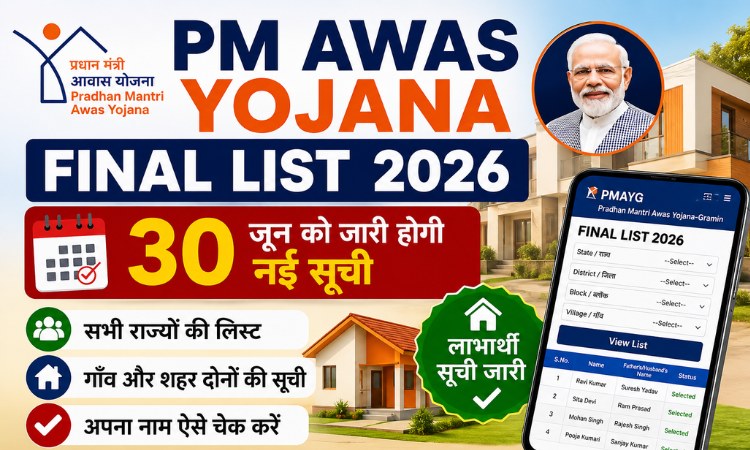
Also Read – PM Awas Yojana Beneficiary List
What are the Documents Required for e-Shram Registration?
You need very few documents to register on e-shram portal. As per the official portal, the requirements are:
- Aadhaar number
- Mobile number linked with Aadhaar (for OTP verification)
- Savings bank account number with IFSC code
If your mobile number is not linked with Aadhaar, you can still register by visiting your nearest Common Service Centre (CSC) or State Seva Kendra (SSK), where registration is done through biometric (fingerprint or iris) authentication instead of OTP. No documents need to be submitted physically at the CSC; you only need to carry your Aadhaar number and mobile number.
How to Register on e-Shram Online: Step-by-Step Process
Registration on e-Shram is completely free and can be done any time, 24 hours a day, 7 days a week. Here is the online process to register on e-shram:
Step 1: Go to the official registration link at register.eshram.gov.in, or visit eshram.gov.in
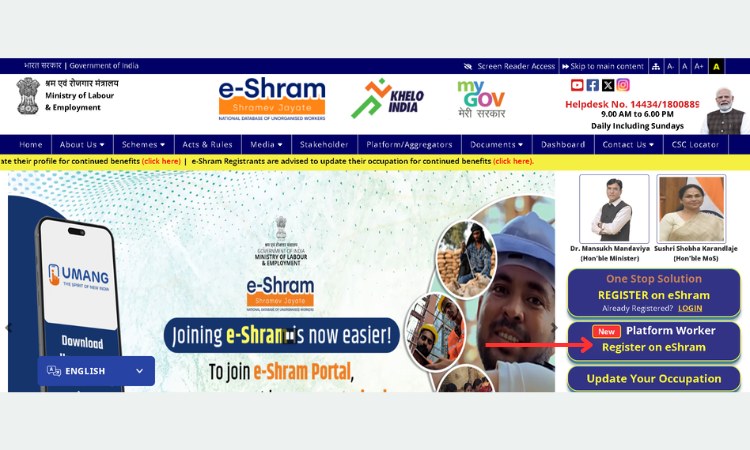
Step 2: On Homepage, click on ‘Register on eShram’.
Step 3: Then enter your Aadhaar-linked mobile number and the CAPTCHA code shown, and click ‘Send OTP’.
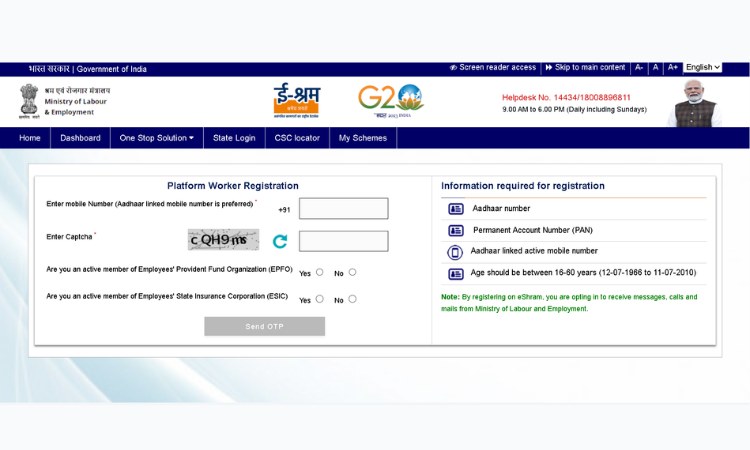
Step 4: Confirm that you are not a member of EPFO, ESIC, or a government-funded NPS scheme (select ‘No’ for both, if applicable).
Step 5: Enter the OTP received on your mobile number to proceed to Aadhaar e-KYC.
Step 6: Enter your Aadhaar number and complete e-KYC using the OTP method. Your name, date of birth, gender, and address will be fetched automatically from Aadhaar.
Step 7: Fill in the remaining details across sections: personal information, current and permanent addresses, educational qualification, occupation (primary and, if applicable, secondary occupation using the NCO code), bank account number with IFSC code, and nominee details.
Step 8: Review all the entered information on the preview page and correct any errors, especially in your name and bank details.
Step 9: Submit the form. Your 12-digit UAN is generated instantly, and your e-Shram card is available to download immediately as a PDF.
Note: If you cannot find your exact occupation in the list, you can search using the NCO (National Classification of Occupation) code system, which is explained further below.
How to Register Through CSC (Offline Method)?
Workers who do not have an Aadhaar-linked mobile number, or who are not comfortable registering online, can visit their nearest Common Service Centre (CSC) or State Seva Kendra (SSK).
At the CSC, registration is completed using Aadhaar biometric authentication (fingerprint or iris scan) instead of an OTP. You can locate your nearest CSC using the official CSC locator tool linked on the e-Shram portal. No documents are required to be submitted at the CSC; you only need to provide your Aadhaar number and mobile number verbally.
What Is UAN and the e-Shram Card?
UAN stands for Universal Account Number. It is a permanent 12-digit number assigned to every worker after successful registration on e-Shram. Once issued, the UAN never changes, and it does not need to be renewed.
The e-Shram card is the physical or digital proof of this registration. Some points worth knowing:
- The e-Shram card has no expiry date; it is valid for a lifetime.
- There is no renewal process for the UAN or the card itself. However, workers are advised to keep their profile details, such as occupation and address, updated.
- During registration, your photo on the card is taken directly from Aadhaar. You cannot upload a separate photo. If you update your photo in Aadhaar, it will reflect on e-Shram only after you complete Aadhaar re-e-KYC on the portal.
- If you move from the unorganised sector to a job covered by EPFO/ESIC, you become entitled only to the benefits applicable to organised sector workers going forward.
How to Check e-Shram Card Status and Download UAN Card?
If you have already registered and want to check your status, download your card again, or update your profile, follow these steps:
Step 1: Visit eshram.gov.in and click on ‘Already Registered? Update’.
Step 2: Now log in using your UAN, Aadhaar number, or registered mobile number, along with an OTP sent to your phone.
Step 3: Once logged in, you can view your profile, download or print your e-Shram card, or edit details such as address, occupation, or bank information.
Step 4: After making any changes, click ‘Save’ or ‘Update’ to confirm. Some changes may need OTP verification again.
Step 5: If you forget your UAN, it will be displayed on the screen once you complete OTP login with your registered mobile number.
Benefits of e-Shram Card
Registration on e-Shram itself does not automatically transfer cash into your account. What it does is create your verified identity as an unorganised worker, which the government and its departments use to check eligibility and deliver benefits under various welfare schemes.
The e-Shram portal lists the following schemes under its Social Security Welfare Schemes section:
| Scheme | Who It Is For | Key Benefit |
| PM-SYM (Shram Yogi Maan-Dhan) | Unorganised workers, age 18-40, monthly income below Rs.15,000 | Voluntary pension scheme; Rs.3,000 monthly pension after age 60; contribution matched equally by the Central Government |
| PMJJBY (Jeevan Jyoti Bima Yojana) | Age 18-50, with a savings/Jan Dhan account | Rs.2 lakh life cover on death due to any cause; premium of Rs.436 per year, auto-debited |
| PMSBY (Suraksha Bima Yojana) | Age 18-70, with a savings/Jan Dhan account | Rs.2 lakh for accidental death or full disability, Rs.1 lakh for partial disability; premium of Rs.20 per year |
| Atal Pension Yojana (APY) | Age 18-40, bank account linked with Aadhaar | Guaranteed monthly pension of Rs.1,000 to Rs.5,000 after age 60, based on contribution |
| Ayushman Bharat – PM-JAY | Eligible families as per scheme criteria | Health cover of Rs.5 lakh per family per year for hospitalisation |
| Public Distribution System (PDS/ONORC) | Below poverty line and eligible families | Monthly foodgrain quota; portable across states for migrant workers under ONORC |
| PMAY-Gramin | Eligible rural families without a pucca house | Housing assistance of Rs.1.2 lakh (plain areas) or Rs.1.3 lakh (hilly areas) |
| National Social Assistance Programme (NSAP) | Elderly with little or no regular income | Monthly pension of Rs.1,000 to Rs.3,000, depending on state contribution |
| PM Kisan Maandhan Yojana | Small and marginal farmers, age 18-40 | Assured monthly pension of Rs.3,000 after age 60 |
Note: Enrolment in schemes such as PMSBY and PMJJBY is done through your bank account or the Jansuraksha portal, and eligibility, premium amounts, and renewal rules are set by the respective scheme guidelines.
e-Shram registration helps establish your identity as an unorganised worker for such schemes but does not replace the separate enrolment process for each one. Always confirm current premium and benefit amounts on the official jansuraksha.gov.in portal, as scheme terms can be revised by the government from time to time.
Difference Between e-Shram Card vs Labour Card (BOCW Card)
Many workers, especially in construction, get confused between the e-Shram card and the state Labour Card (also called the BOCW card). These two cards are different:
- e-Shram card is issued by the Central Government (Ministry of Labour & Employment) and covers workers across all unorganised sector occupations, not just construction.
- Labour card (BOCW – Building and Other Construction Workers card) is issued by individual State Labour Departments/Welfare Boards and is meant only for registered construction workers in that state.
- A construction worker can, and generally should, hold both cards, since each connects to a different set of welfare benefits.
e-Shram Helpline and Grievance Redressal
If you face any issue with registration, login, or your profile, you can reach the official e-Shram support channels:
- National Helpdesk Number: 14434 or 1800-889-6811
- Helpdesk Timing: 9:00 AM to 6:00 PM, daily, including Sundays
- Grievance Portal: gms.eshram.gov.in, for lodging and tracking formal complaints
If you are unable to connect to the helpline due to high call volume, the official portal advises trying again after some time, or filing your grievance directly on the online grievance portal.
Conclusion
Overall, an e-shram is more than a card. It is an important step towards providing social security and recognition to millions of unorganised workers across India.
After registration on the e-Shram portal, workers get a UAN (Universal Account Number) and become part of a national database that helps the government deliver welfare schemes more effectively. The registration process is free, simple, and available online. All you need is just an Aadhaar card and a mobile number linked to it.
Having an e-Shram Card does not guarantee you direct financial assistance. But it acts as an important gateway to various government schemes such as accident insurance, pension, health benefits, and other social security programmes for eligible workers.
You have to always keep your personal details like bank account, occupation, and mobile number updated on the e-Shram portal to receive payment on time.
If you face any issues during registration or while downloading your UAN card, use the official e-Shram helpline or visit the nearest Common Service Centre (CSC) for assistance.
Read On – Saral Haryana Portal
Frequently Asked Questions
Q1. Is e-Shram registration free?
Ans. Yes. Registration on e-Shram is completely free, whether done online or through a Common Service Centre. Workers are not required to pay any fee to any registering entity.
Q2. Does the e-Shram card expire?
Ans. No. The e-Shram card and the UAN do not have an expiry date and do not need renewal. However, you should keep your profile details updated.
Q3. Are there any income or education criteria to register on e shram portal?
Ans. There is no income limit and no educational qualification required. The only condition is that the applicant should not be an income tax payee and should not be a member of EPFO, ESIC, or a government-funded NPS scheme.
Q4.Can a 16-year-old register on e-Shram?
Ans. Yes, workers aged 16 to 59 years are eligible, provided they meet the other registration conditions for unorganised workers.
Q5. Are farmers and agricultural labourers eligible for e shram card?
Ans. Yes. Agricultural labourers and landless farmers are eligible to register on e-Shram as unorganised workers.
Q6. What happens if I move from an unorganised job to an organised sector job?
Ans. If you move to a job covered under EPFO or ESIC, you become entitled only to the benefits meant for organised sector workers from that point forward.
Q7. Will my e-Shram data be checked against EPFO, ESIC, or Income Tax records?
Ans. Yes. As stated in the official FAQs, the data provided is validated periodically against EPFO, ESIC, and Income Tax department records.
Q8. Can I update my mobile number on e-Shram?
Ans. Yes. You can log in through ‘Update profile using Aadhaar’ and update your mobile number if it is linked to Aadhaar. If your Aadhaar-linked mobile number is unavailable, you can visit the nearest CSC or SSK to update it.
Q9. Is there a last date to register on e-Shram?
Ans. No, there is no last date. Registration is open 24×7 with no deadline.