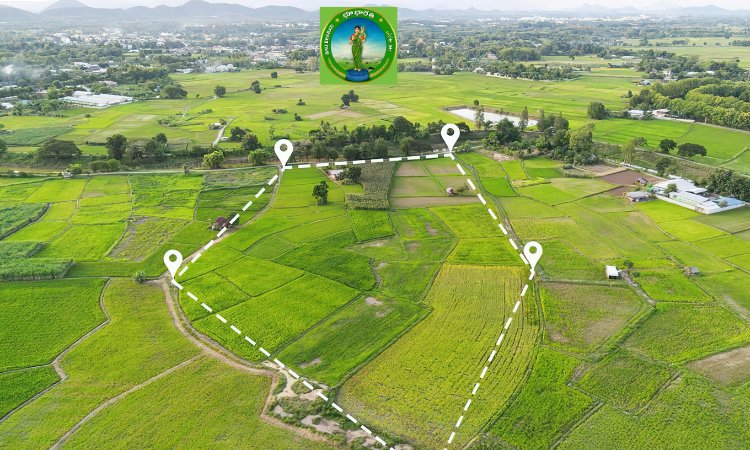




If you own land in Uttar Pradesh or are planning to buy a piece of property anywhere in the state, one thing you must know about is Bhu Naksha UP.
It is an official government online portal that lets you see the exact map of any land parcel in UP, and this is completely free of cost, and you can do all this from your home.
Before the launch of this portal, a farmer or landowner had to visit the local Patwari, Tehsil office, or revenue department multiple times to get a basic map of their land.
This was time-consuming, expensive, and often confusing. The UP government changed all of this by bringing land maps online through the Bhu Naksha UP portal.
Today, whether you are a small farmer in Gorakhpur, a property buyer in Lucknow, or a top builder in Noida, you can check the exact boundaries, ownership status, and land type of any plot in Uttar Pradesh within minutes.
All you need is an internet connection and a few basic details like the district, tehsil, village, and Khasra number.
In this detailed article, we will learn what UP Bhu Naksha is, how to check the Land Map on UP Bhu Naksha, its key features, what details you can find, and answers to the most common questions people ask about it. So, let us start this blog.
What is Bhu Naksha UP?
Bhu Naksha UP is an official digital land mapping portal launched by the Government of Uttar Pradesh (UP). The name itself tells you what it does: “Bhu” means land, and “Naksha” means map in Hindi. So, Bhu Naksha UP literally means the land map of Uttar Pradesh.
The portal is available at upbhunaksha.gov.in. This portal is developed and maintained by the National Informatics Centre (NIC) along with the Revenue Department of Uttar Pradesh.
It is part of a larger national programme called the Digital India Land Records Modernization Programme (DILRMP), which aims to digitize all land records across India.
On this portal, you will find what are called cadastral maps. A cadastral map is a detailed map that shows the exact boundaries, size, survey number, and ownership details of each piece of land. These maps cover every district, tehsil, and village across all 75 districts of Uttar Pradesh.
This portal is directly linked to another important UP government portal called Bhulekh UP (upbhulekh.gov.in), and it stores ownership records. Together, these two portals give you both the visual map and the ownership information for any land parcel in the state.
Difference between Bhu Naksha UP and Bhulekh UP
Many people get confused between Bhu Naksha UP and Bhulekh UP. Here is a simple way to understand the difference:
- Bhu Naksha UP (upbhunaksha.gov.in)- It shows you the MAP of the land. It displays the visual boundaries, plot shape, size, and position of a land parcel on a digital map.
- Bhulekh UP (upbhulekh.gov.in) – It shows you the record of the land. This contains ownership details like Khasra number, Khatauni (record of rights), and mutation status.
Think of it this way: Bhu Naksha is like Google Maps for land parcels, while Bhulekh is the government register that says who owns what. You need both to fully verify a piece of land before buying or dealing with it legally.
Why Was Bhu Naksha UP Launched?
The government of Uttar Pradesh launched the UP Bhu Naksha portal to solve several real-world problems that citizens were facing with land records. Here are the main reasons behind its launch:
- To Save Time and Money – Earlier, if you wanted to see the map of your land, you had to visit the Patwari or Tehsil office, sometimes multiple times. This took days or even weeks. The Bhu Naksha portal allows anyone to see the land map within minutes, sitting at home, without spending a single rupee. It saves a lot of time.
- Reduce Land Fraud – Another major reason was land fraud in Uttar Pradesh. Land fraud is a serious problem in Uttar Pradesh and across India. People used to sell the same land to multiple buyers by showing fake boundaries or claiming ownership of government land. By making land maps publicly available online, the government has made it harder for such fraud to happen. Any buyer can now verify the land before paying.
- To Make Land Records Transparent – It brings more Transparency in land records. Now, anyone can check any land at any time. This reduces corruption and the need for mediators. Now, no citizen needs to pay someone to get basic land information.
- To Support Digital India – The UP Bhu Naksha portal is part of the Digital India programme. The goal is to make all government services available online so that citizens can access them easily without unnecessary visits to offices.
- To Help in Legal and Financial Processes – Banks, courts, lawyers, and government departments often need land maps for loan approvals, court cases, and planning purposes. Having a verified digital map online makes these processes faster and more reliable.
Key Features of Bhu Naksha UP Portal
This portal offers several useful features that make it easy to use and valuable for various purposes:
- Interactive Map: You can zoom in and out, and click on any plot to see its details.
- District-wise Coverage: The portal covers all 75 districts of Uttar Pradesh, with tehsil and village-level detail.
- Khasra-based Search: You can search for a specific plot by entering its Khasra number.
- Ownership Integration: This portal is linked to Bhulekh UP, so when you click on a plot, it shows the owner’s details.
- Land Classification Display: It also shows whether the land is agricultural, residential, government, or any other type.
- Download and Print Options: You can download the land map as a PDF and print it for legal or personal use.
- Mobile Friendly: The official website works on mobile phones too, so you do not need a computer.
- Multi-search Options: You can search by plot number, owner name, or survey date.
- Free of Cost: All services on the portal are completely free for citizens.
Districts Covered Under Bhu Naksha UP
UP Bhu Naksha covers all 75 districts of Uttar Pradesh. This means whether you own land in a major city like Lucknow, Kanpur, or Agra, or in a smaller district like Mahoba or Shravasti, you can check the land map online. Some of the major districts include:
- Lucknow, Agra, Kanpur Nagar, Varanasi, Prayagraj, Meerut, Ghaziabad, Gorakhpur
- Noida (Gautam Buddha Nagar), Bareilly, Moradabad, Aligarh, Mathura, Jhansi
- Ayodhya, Azamgarh, Saharanpur, Muzaffarnagar, Firozabad, Sitapur
- All remaining districts, including tribal and remote areas like Sonbhadra and Shravasti
Even the smallest villages within each district are mapped in the system. If your plot is not visible, it may not have been digitized yet, and you will need to visit your local Tehsil office for assistance.
How to Check Land Map on Bhu Naksha UP Online?
You can easily check the land map on the Bhu Naksha UP Portal. Just follow these steps carefully:
Step 1: Go to the official Bhu Naksha UP portal at upbhunaksha.gov.in Make sure you are on the official government website to avoid fake sites.
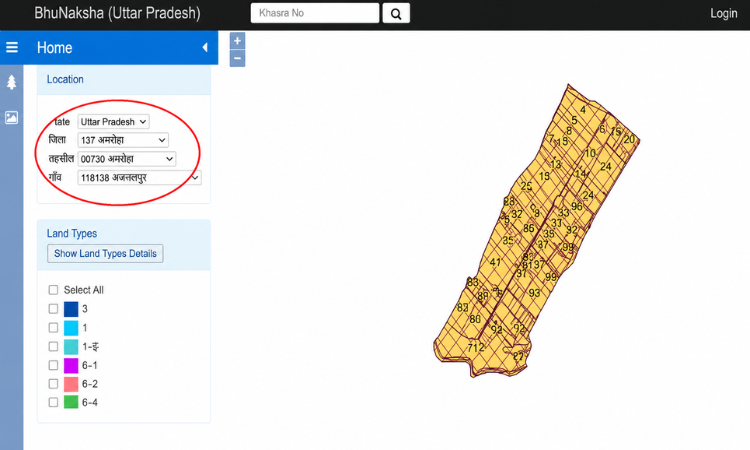
Step 2: On the homepage, you will see dropdown menus. Select your district from the first dropdown list. For example, if your land is in Lucknow, select “Lucknow” from the list.
Step 3: After selecting the district, choose your Tehsil (sub-district) from the next dropdown. Each district has multiple tehsils.
Step 4: After the Tehsil, select your village name from the village dropdown. This list will automatically update based on the Tehsil you chose.
Step 5: Once you fill in all three details, a map of the selected village will appear on your screen. This shows all the land parcels (plots) in that village.
Step 6: Click on the specific plot you want to check on the map. If you know the Khasra number, you can also enter it in the search bar to locate the plot directly.
Step 7: After clicking on the plot, a panel will appear on the left side of the screen showing details like the Khasra number, owner name, land area, and land classification.
Step 8: To download the Land map, click on “Map Report” and then select “Download PDF”. You can save this PDF on your phone or computer, and print it if needed.
Also Read – Manav Sampada UP
How to Login to UP Bhu Naksha @upbhunaksha.gov.in?
Logging in to UP Bhu Naksha (Land Map) is very simple and allows authorized users to access land maps and related services online. Just follow these steps:
Step 1: Visit the Official Portal
Step 2: On the homepage, look for the “Login” button and click on it.
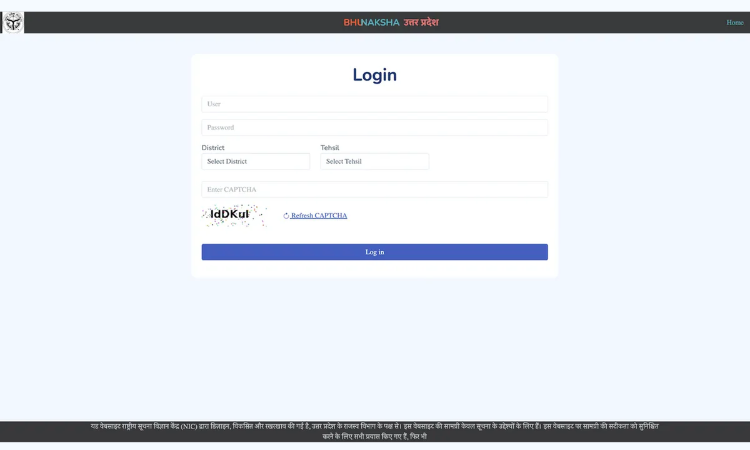
Step 3: A login form will appear, enter your credentials, such as Username and Password, and enter the Captcha Code.
Step 4: Click on the Login button after entering the required information.
What Information Can You Find on Bhu Naksha UP?
The Bhu Naksha UP portal provides a wide range of information about any land parcel. Here is what you can typically find on this portal:
- Plot Boundaries and Survey Numbers: The most important thing the portal shows is the exact visual boundary of each plot. This tells you where your land starts and ends, and how it compares with neighboring plots.
- Khasra Number: The Khasra number is a unique identification number given to each land parcel. It is used in all government records, court documents, and financial transactions related to that land. You can search by this number to directly locate your plot.
- Khatauni Details: Through the integration with Bhulekh UP, you can also view the Khatauni details, which include the name of the landowner, co-owners (if any), and the total land area.
- Land Classification / Land Type: This portal also shows what type of land a particular plot is, whether it is residential, Agricultural land, Government land, Forest Land, uncultivated land, etc. This is very important information for buyers because agricultural land cannot be used for construction purposes without a proper change in land use (CLU) approval.
- Adjacent Plots and Road Access: The map shows neighboring plots and whether there is any road access near your land. This is useful for planning construction, farming, or development.
- Mutation Status: Mutation refers to the official transfer of land records from one owner to another after a sale or inheritance. The portal can show if a mutation has been done or is pending for a specific plot.
How to Download Bhu Naksha UP Map (PDF)?
You can easily download the land map from this portal. Just follow these simple steps:
Step 1: Open upbhunaksha.gov.in and navigate to your plot using the steps mentioned above.
Step 2: Once the plot details appear on your screen, look for the “Map Report” option.
Step 3: Click on “Map Report”. A new page or pop-up will open showing the detailed land map.
Step 4: Click on “Download PDF” to save the file on your device.
Step 5: You can open this PDF file and print it using any printer.
Please note: The downloaded map is useful for reference and initial verification. However, for official purposes like court submissions or property registration, you may need a certified copy from the local Tehsil or Revenue Department office.
Who Can Use Bhu Naksha UP?
This portal is available for everyone who wants to see the Land Map or details of their land in Uttar Pradesh. It can be used by:
- Farmers
- Landowners
- Property Buyers
- Property Sellers
- Real Estate Agents and Consultants
- Lawyers and Legal Professionals
- Banks and Financial Institutions.
- Government Officials
- General Citizens
Why Bhu Naksha UP is Important for Property Buyers?
If you are planning to buy land or a house in Uttar Pradesh, you should definitely check the Bhu Naksha UP portal, and it should be the first step. Here is why:
- Verify Boundaries Before Buying: Many land disputes in India happen because of unclear or disputed boundaries. The seller may show you a bigger piece of land than what is officially recorded. By checking the Bhu Naksha, you can see the exact boundary of the plot and compare it with what is being offered to you.
- Check if the Land is Government or Private: Sometimes, sellers try to sell government land or land near forests and rivers by showing fake documents. The Bhu Naksha portal clearly shows the land type. If it shows the land as government land, you should immediately walk away from the deal.
- Verify the Seller’s Ownership: By checking both Bhu Naksha UP and Bhulekh UP together, you can match the Khasra number with the owner’s name and see if the person selling the land is actually the legal owner.
- Check for Legal Disputes: The portal can also show if a plot has any ongoing legal issues or encumbrances (such as a loan taken against the property). This helps you avoid getting into a legal mess after buying.
- Plan Your Construction Better: Once you know the exact boundaries of your land and the land around it, you can plan construction more accurately. You will know exactly how much space you have and where the boundaries lie.
Why Bhu Naksha UP is Important for Farmers
After the launch of this Portal, it gives a lot of benefits to the farmers. Here is how it helps them:
- Now, farmers can verify the exact size and boundaries of their fields without depending on the Patwari.
- They can check the official land type to ensure their field is classified as agricultural land.
- If there is a dispute with a neighbor about boundary lines, the digital map serves as evidence.
- For government schemes and subsidies, many forms require the Khasra number and land details, which can be easily checked on the Portal.
- Bhu Naksha and Khasra details are required for crop loan applications at banks so that farmers can find these from the Bhu Naksha UP Portal.
Legal Status of Bhu Naksha UP Maps
One question many people ask is: are the maps from Bhu Naksha UP legally valid? Here is the answer:
The maps and records available on the Bhu Naksha UP portal are verified and maintained by the Revenue Department of Uttar Pradesh. They can be used for:
- Verifying land ownership and boundaries
- Reference in court cases and legal proceedings
- Loan applications and bank submissions
- Property registration and mutation applications
- Government scheme applications
However, there is an important point to note: For matters where you need a certified official copy (like submitting to a court or for certain legal registrations), you should obtain a physically certified copy from the local Tehsil or Revenue Department (Land Record Archive) office. The online version is primarily for verification and reference purposes.
How Banks and Financial Institutions Use Bhu Naksha UP?
The Banks and financial institutions in Uttar Pradesh widely use this portal. Here are some common uses of the Bhu Naksha UP Portal:
- Property Loan Verification: It is used by bankers to verify the boundaries and ownership of the land before approving a home loan or land loan.
- Collateral Assessment: For loans taken against land as security, banks use the portal to confirm the land’s size, type, and ownership.
- Fraud Prevention: Banks cross-check the borrower’s land details with what is shown on the portal to prevent fraudulent loan applications.
- Legal Checks: Legal teams of banks use the map data as part of their due diligence before approving any property transaction.
Common Problems While Using Bhu Naksha UP and Their Solutions
When you use the Bhu Naksha UP portal, you might face some technical issues. This portal is easy to use, but sometimes, you might face certain issues.
Here are the most common problems and how to handle them:
Problem 1: Plot Not Visible on the Map
Sometimes, especially in newly developed areas or recently subdivided plots, the land may not appear on the portal.
Solution: Visit your local Tehsil or Revenue Department office and request that the records be updated. It is also possible that the digitization of your area is still in progress.
Problem 2: Wrong Owner Name Showing
If you have recently bought land or inherited it, the old owner’s name may still be showing in the records.
Solution: Apply for mutation at your local Tehsil office. Once the mutation is done, the records will be updated on the portal.
Problem 3: Website Not Loading or Slow
It is very common on government website. Most portals face technical issues, especially during peak usage times.
Solution: Try accessing the portal during non-peak hours (early morning or late night). You can also try a different browser or clear your browser cache and cookies.
Problem 4: Boundary Mismatch
The boundary shown on the portal may differ slightly from what is visible on the ground.
Solution: Contact the local Lekhpal or Revenue Inspector for a physical demarcation survey. The online map is based on records that may need ground verification in some cases.
Problem 5: Khasra Number Not Found
If you enter a Khasra number and it does not show up, there may be a data entry error, or the number may have changed due to land division or consolidation.
Solution: Check with the Patwari or Tehsil office to get the updated Khasra number for your land.
How to Get a Certified Copy of Land Records in UP?
While the Bhu Naksha UP portal is great for online reference, there are situations where you need an official certified copy. Here is how to get one:
- You can visit your local Tehsil office or Revenue Department office.
- Carry a valid identity proof (Aadhar Card, Voter ID, etc.) and the Khasra number of your land.
- Submit a written application requesting a certified copy of the land map or Khatauni.
- Pay the prescribed fee (usually a very small amount).
- The office will process your request and provide the certified copy, typically within a few working days.
You can also apply for certain certified documents online through the UP government’s Seva Kendra or e-district portal. However, physical certification is still required for most legal purposes.
Contact Information and Helpline for Bhu Naksha UP
If you face any problem while using the Bhu Naksha UP portal or have questions about your land records, you can contact the following:
- Official Website: upbhunaksha.gov.in
- Related Portal for Ownership Records: upbhulekh.gov.in
- Helpline: Contact your local District Revenue Office or Tehsil office for help with specific land record issues.
- In-person Help: Visit your local Tehsil office or Revenue Department and speak to the Lekhpal or Revenue Inspector for your area.
Practical Tips for Property Buyers in Uttar Pradesh
Based on what experienced property professionals and legal experts advise, here are some practical tips if you are buying land in UP:
- Always check Bhu Naksha UP first before visiting a property. It will help you understand the exact location and boundaries before you even go there.
- You should always cross-check with Bhulekh UP to verify the owner’s name against what the seller tells you.
- If the land shows as government land, forest land, or river bed on the portal, do not buy it, no matter how attractive the deal looks.
- Ask the seller for all original documents, including the original sale deed, mutation certificate, and Khatauni copy.
- Hire a local property lawyer for due diligence. The online portals are a good starting point, but a legal professional can identify issues that are not visible online.
- Before buying any land, you must visit the land physically, check the boundaries on the ground, and compare it with the map shown on the portal.
- Check if there are any pending court cases or government acquisitions planned for the area.
- Ensure that the mutation is done promptly after buying the land so your name appears in the official records.
Conclusion
Overall, UP Bhu Naksha is one of the most important digital services provided by the Uttar Pradesh government.
It has made the process of checking land maps simple, transparent, and accessible to everyone. This portal is important for everyone, from farmers to buyers to legal professionals.
Now, anyone can easily know the exact size of their field. If you are a buyer, you can easily verify the land before purchasing.
This portal covers all 75 districts of Uttar Pradesh and allows anyone to view, download, and print land maps completely free of cost. It works on both desktop and mobile.
While the portal is a great tool for initial verification and reference, always remember to do complete due diligence before any property transaction.
Check the Bhu Naksha portal, cross-check ownership on Bhulekh UP, visit the land physically, and consult a property lawyer if you are unsure about anything.
Read On – MP Bhulekh
Frequently Asked Questions
Q1. What is the official website for Bhu Naksha UP?
The official website is upbhunaksha.gov.in. This is the only government-authorized portal for checking land maps in Uttar Pradesh.
Q2. Is Bhu Naksha UP free to use?
Ans. Yes, using the Bhu Naksha UP portal is completely free. You do not need to pay any fee to view or download land maps from the portal. The service is provided free of cost to all citizens of India.
Q3. Is the map downloaded from Bhu Naksha UP legally valid?
Ans. The maps and records on the portal are maintained by the Revenue Department and can be used for verification and reference. For legal proceedings in court, you may need a certified physical copy from the local Tehsil office. The online copy is widely accepted by banks and government departments.
Q4. What if my land is not showing on the Bhu Naksha UP portal?
Ans. This can happen if the land has not yet been digitized, or if there is an error in the records. In such cases, visit your local Tehsil or Revenue Department office and ask them to update or correct the records.
Q5. What is a Khasra number and where do I find it?
Ans. A Khasra number is a unique number assigned to each individual plot of land in a village. You can find it on your old land sale deed, the Khatauni copy, or by asking your local Patwari. On the Bhu Naksha UP portal, you can also click on your plot on the map to find its Khasra number.
Q6. What is the difference between Bhu Naksha UP and Bhulekh UP?
Ans. Bhu Naksha UP (upbhunaksha.gov.in) shows the visual map and boundaries of land parcels. Bhulekh UP (upbhulekh.gov.in) shows ownership records and the Khatauni (record of rights). For complete land verification, you should check both portals.
Q7. How often is the Bhu Naksha UP portal updated?
The portal is periodically updated by the Revenue Department as part of the Digital India Land Records Modernization Programme. However, updates may take some time to reflect, especially in remote areas. For the most current information, always cross-check with your local Tehsil office.
Q8. What should I do if the owner name shown is wrong?
If the land has recently been sold or inherited and the records have not been updated, the old owner’s name may still show. You need to apply for mutation at the local Tehsil office. Once the mutation is completed, the records will be updated on the portal within some time.