



If you own land in Madhya Pradesh or are planning to buy a property there, you must have come across the term MP Bhulekh.
In simple words, MP Bhulekh is an online portal where you can check all details related to land in Madhya Pradesh. The full name is Madhya Pradesh Bhulekh, and the Revenue Department of the Madhya Pradesh government manages it.
The major problem before this portal was that people had to visit the Patwari office or the Tehsil office again and again to get basic land information. It was time-consuming, confusing, and sometimes even corrupt.
The government then decided to put all land records online so that any citizen can check them from home, and the government of Madhya Pradesh has launched the portal to MP Bhulekh (mpbhulekh.gov.in) or MP Bhu Abhilekh.
The MP Bhulekh portal was officially launched on May 1, 2017. Since then, it has become one of the most useful digital tools for farmers, property buyers, legal professionals, and government officials in the state.
Why MP Bhu Abhilekh Was Needed?
Land disputes are one of the most common legal problems in India. Many of these disputes happen simply because records are unclear, outdated, or not easily available to the public. In Madhya Pradesh alone, thousands of court cases are related to land ownership and boundary conflicts.
Before the MP Bhulekh portal, the process to get land records involved:
- Going to the Patwari or Tehsildar office multiple times
- Filling physical forms and waiting for days
- Paying unofficial fees to middlemen
- Risk of getting wrong or manipulated records
The MP Bhulekh portal changed all of this. Today, anyone can view land records within minutes, for free, without visiting any office.
MP Bhulekh WebGIS 2.0: New Portal
It is one of the most important updates to the MP Bhulekh system in recent times. The Government of Madhya Pradesh officially launched WebGIS 2.0 on July 30, 2025. This new portal replaces the older WebGIS 1.0 version and offers a much better experience for citizens who want to access land records online.
The new portal is available at a separate URL: webgis2.mpbhulekh.gov.in
Before the launch, the government first tested WebGIS 2.0 as a pilot project in two districts: Narsinghpur and Seoni.
After it worked successfully there, it was rolled out across the entire state on July 30, 2025. Principal Secretary of the Revenue Department, Vivek Porwal, and Revenue Commissioner Anubha Srivastava announced the launch.
What is WebGIS 2.0 MP Bhulekh?
The full form of WebGIS is Web-based Geographic Information System. In simple words, it is a technology that combines land records (like ownership details and plot numbers) with digital maps.
So instead of just reading text data about a piece of land, you can actually see it on a map, check its exact boundaries, measure its area, and view the plots around it. Overall, it will enhance the user experience.
The earlier version, WebGIS 1.0, did provide maps, but it had several limitations in terms of speed, accuracy, and user experience.
WebGIS 2.0 fixes all of that with modern technology, faster loading, better map resolution, and new features that the old version did not have.
Key Features of WebGIS 2.0
Here are some major key features of this newly launched WebGIS 2.0
- Interactive Map Display: WebGIS 2.0 displays all land parcels on a live digital map. You can zoom in and zoom out, move across different areas, and click on any plot to see its details.
- WhatsApp Integration: With WebGIS 2.0, you can now receive your Khasra and other certified land documents directly on WhatsApp.
- Aadhaar-Based OTP e-KYC: WebGIS 2.0 uses Aadhaar-linked OTP verification for identity confirmation. This makes the system more secure.
- Land Parcel Search with Multiple Options: On WebGIS 2.0, you can search for a land parcel using different methods. These include the survey number, Khata number, village name, GPS coordinates, and owner name.
- Graphical Boundary View: Once you select a plot on the map, the system highlights its exact boundaries in a clear graphical format.
- Attribute Display on Map: When you click on any plot on the map, it shows you all the key details right there, including the owner’s name, land area, land category, Khasra and Khata numbers, land use type, and details of nearby plots.
- Measurement Tools: WebGIS 2.0 allows you to measure distances and areas directly on the map.
- Print and Download Options: You can print or download the map along with the plot details from the portal.
- Integration with Google Maps and OpenStreetMap: WebGIS 2.0 integrates with Google Maps and OpenStreetMap to provide accurate cadastral boundary data.
- Faster and More Secure System: Compared to WebGIS 1.0, the new version loads much faster, handles more users at the same time, and provides better data security.
What Information Can You Find on MP Bhulekh Portal?
The MP Bhu Abilekh portal gives access to several types of land records. Here is a clear explanation of each:
1. Khasra
Khasra is a document that contains plot-level information. It tells you the plot number, area of the land, owner name, the type of land (agricultural or non-agricultural), and the crop grown on it. If you want to verify whether a plot belongs to a specific person, checking the Khasra is the first step.
2. Khatauni
Khatauni is a record that shows all the land owned by a single person or a family in a village. If one person owns five different plots in a village, the Khatauni will list all five plots together. It is also called the B1 register in some documents.
3. Bhu Naksha (Land Map)
Bhu Naksha means land map. It shows the boundaries of a plot, its shape, the size, and which plots are next to it. This is very useful for checking whether the land you are buying has the correct boundaries as shown in the documents. In 2026, the portal upgraded to WebGIS 2.0, which provides much better map accuracy and clearer plot boundaries.
4. Adhikar Abhilekh (Rights Record)
This document shows who has the legal rights over a piece of land. It covers ownership rights, tenancy rights, and other legal rights related to a land parcel. This is especially useful in cases of inheritance, where multiple family members may have rights to the same land.
5. Aabadi Adhikar Abhilekh
This record is related to residential land within village limits. It shows who has the right to live on or use a particular residential plot inside a village boundary area.
6. B1 Register
The B1 is basically the combined land record of a landholder. It shows all plots, areas, and ownership details in one place. It is also legally acceptable as a proof of land ownership in many situations.
Free Services vs Paid Services on MP Bhulekh Portal
One of the best features of the MP Bhu Abilekh portal is that many services are completely free. However, some services that require certified or legally valid copies come with a small fee. Here is the difference:
| Free Services | Paid Services (Certified Copies) |
| View Khasra and Khatauni | Certified copy of Khasra/Khatauni |
| View Bhu Naksha (land map) | Digitally signed land documents |
| View Aabadi Adhikar Abhilekh | Encumbrance certificate |
| Check land type and area | Revenue Court order copy |
| View population rights record | Land title booklet |
| Search by owner name or plot number | Record room document copy |
| No login or registration required | Login and wallet recharge required |
Important: Free records are good for personal reference. But if you need them for a court case, bank loan, or property registration, you must download the digitally signed certified copies.
How to Register as a New User on MP Bhulekh?
Here are simple steps to register on the MP Bhulekh portal:
Step 1: Firstly, you have to visit the official MP Bhulekh portal, which is (https://webgis2.mpbhulekh.gov.in/)
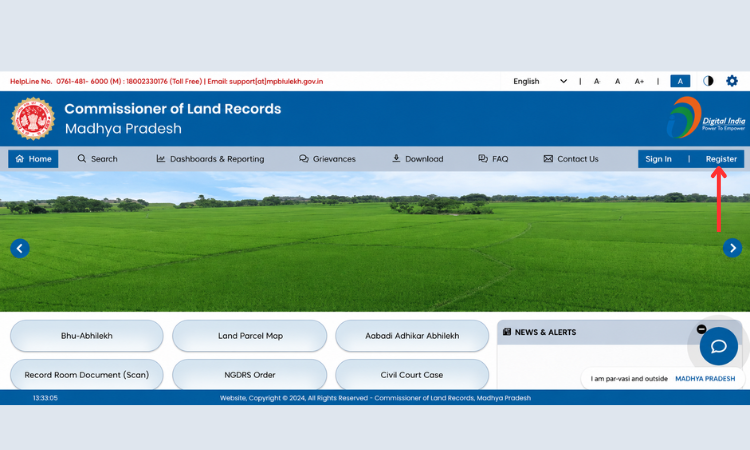
Step 2: Click on the “Register” or “New User Registration” option on the homepage.
Step 3: After this, you have to enter your details like full name, mobile number, email ID, and address.
Step 4: Create a username and a strong password.
Step 5: Verify your mobile number using the OTP sent to your registered mobile.
Step 6: Complete the registration process and submit the form.
How to View Khasra or Khatauni on MP Bhulekh Portal?
Here are simple view Khasra or Khatauni on the MP Bhulekh portal:
Step 1: Go to the official website of MP Bhu Abilekh, webgis2.mpbhulekh.gov.in
Step 2: On the homepage, click on the option that says ‘Bhu-Abhilekh’
Step 3: When the system asks whether you want an ordinary (free) copy, click ‘Yes’
Step 4: Select your District from the dropdown list
Step 5: Select the Tehsil (sub-district area)
Step 6: Then select your Village name
Step 7: You can search by Khasra number, Khatauni number, or the owner’s name
Step 8: Enter the required details and complete the captcha
Step 9: Click on ‘View Details’ to see the land record
Step 10: You can print or save the record from your screen
How to View MP Bhu Naksha on MP Bhulekh?
If you want to see MP Bhu Naksha online, then follow these simple steps.
Step 1: Go to webgis2.mpbhulekh.gov.in
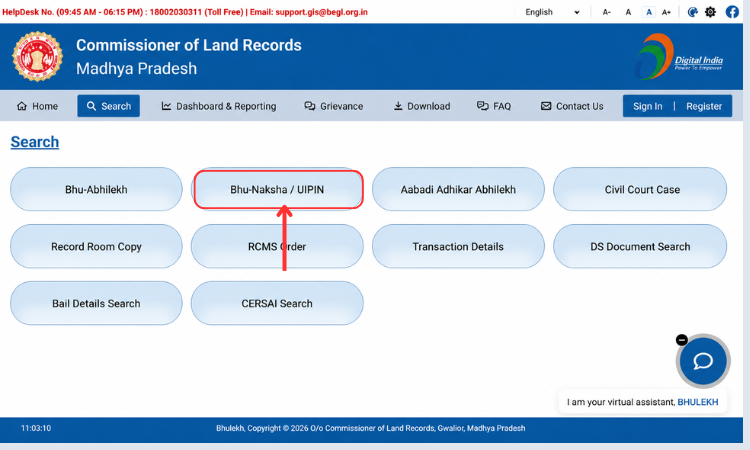
Step 2: Click on the ‘Bhu Naksha’ option on the homepage
Step 3: Select your District, Tehsil, and Village from the dropdowns
Step 4: Choose Sheet Number, Khasra Number, or Owner Name
Step 5: Click on ‘Get Report’
Step 6: The land map will be shown on your screen
Step 7: You can zoom in or zoom out to see boundary details
Step 8: Take a printout if needed
How to Check Mutation Status on MP Bhulekh?
Step 1: Visit mpbhulekh.gov.in
Step 2: Look for the ‘Track Mutation Status’ option under the Services section
Step 3: Enter your mutation request number or Khasra number
Step 4: Then click on the Submit button Step 5: The current status of your mutation application will be shown
How to Apply for Land Use Change on MP Bhulekh Portal?
If you want to change the use of your land (for example, from agricultural land to residential, commercial, industrial, or other non-agricultural purposes), you can submit a Diversion Intimation / Land Use Change Application through the MP Bhulekh portal.
Here are some simple steps to do this:
Step 1: Go to the official MP Bhulekh website

Step 2: On the homepage, click on: Diversion Intimation / Re-assessment Diversion
Step 3: Create a New Application and enter the required land details like District, Tehsil, Village, Khasra Number, Land Area, and Ownership Details.
Step 4: Select the New Land Use and choose the purpose for which the land will be used, like Residential, Commercial, Industrial, Institutional and Other approved categories.
Step 5: After this, upload required documents like Aadhaar Card, Land Ownership Documents, Khasra Copy, Land Map (Bhu Naksha), Power of Attorney (if applicable), Affidavit or other supporting documents.
Step 6: Review all the details
Step 7: Pay Diversion Charges
Other Important Services on MP Bhu Abhilekh Portal
MP Bhulekh is not just about viewing land records. The portal also provides several other useful services:
1. Land Mutation (Naam Antarit)
When land changes hands due to a sale, inheritance, or gift, the ownership records must be updated. This process is called mutation.
On the MP Bhulekh portal, you can apply for mutation online. Once applied, you can also track the mutation status. Mutation usually takes 15 to 30 days depending on the case. However, final approval still requires verification by the Revenue Department in person.
2. Land Diversion (Vyapavartan)
If you want to use agricultural land for a non-agricultural purpose, like building a house or a shop, you need to apply for land diversion. This is also called Vyapavartan in Hindi.
You can apply for this online through the MP Bhulekh portal. You will need ownership proof, a land map, and a no-objection certificate from relevant authorities. The fee for diversion varies based on the land type and its location.
3. Land Revenue Payment Online
You can pay land tax (revenue) directly through the portal without going to the government office. This saves time and provides a digital receipt for your records.
4. Encumbrance Certificate
An encumbrance certificate tells you whether a land parcel has any pending loans, mortgages, or legal disputes registered against it. If you are buying land and want to make sure it is free from liabilities, checking the encumbrance certificate is very important.
5. Grievance Filing and Tracking
If there is a mistake in your land records or if you are facing any problem related to land, you can file a complaint directly on the portal. After filing, you can track the status of your complaint online by entering the acknowledgement number.
6. Property Registration Tracking
If you have recently registered a property and want to track its status, the MP Bhulekh portal allows you to do that as well.
7. Aadhaar e-KYC
The portal supports Aadhaar-based e-KYC for user verification, making the registration process faster and more secure.
Districts Covered Under MP Bhulekh
MP Bhulekh covers all districts of Madhya Pradesh. Users can select their district, tehsil, village, and land details to access Khasra, Khatauni, and other land records online.
Here is the list of districts under MP Bhulekh:
- Bhopal
- Indore
- Jabalpur
- Gwalior
- Ujjain
- Sagar
- Rewa
- Satna
- Ratlam
- Dewas
- Khandwa
- Khargone
- Chhindwara
- Sehore
- Vidisha
- Betul
- Shivpuri
- Morena
- Damoh
- Neemuch
Benefits of MP Bhulekh Portal
Here is a summary of the key benefits this portal offers to citizens:
- You do not need to visit the Patwari or Tehsil office for basic land information
- Available 24 hours a day, 7 days a week, from any part of the world
- It reduces the chances of fraud and fake land documents
- Helps buyers verify ownership before purchasing land
- Reduces land disputes by making ownership details public
- Supports farmers in getting loans by providing verified land records
- Digitally signed documents are legally valid in courts and banksIt saves time, money, and avoids unnecessary middlemen
- Linked with Aadhaar for better identity verification
MP Bhulekh Portal: Common Problems and Their Solutions
Some users face issues while using the portal. Here are the common problems and how to fix them:
1. Wrong Information in Land Records
If the name, area, or boundary details are wrong in your land records, visit the nearest Tehsil office with your original documents. You can also raise a correction request online through the portal’s grievance section.
2. Portal Not Loading or Slow Speed
This usually happens due to heavy traffic on the portal. Try accessing it during non-peak hours, such as early morning or late evening. You can also clear your browser cache.
3. Khasra Number Not Found
Double-check that you have selected the correct District, Tehsil, and Village. Even a small spelling error or wrong selection can give you incorrect results. If the plot is newly registered, it may take some time to reflect on the portal.
4. Login or Password Issues
Use the ‘Forgot Password’ option on the login page and reset it using your registered mobile number and OTP.
5. Technical Issues
For technical problems, you can use the contact form on the portal or call the helpline. The official address for the land records department is: Government of Madhya Pradesh, Rajaswa Bhawan, Naka Chandrabadni, Needam Road, Gwalior – 474004.
Legal Framework Behind MP Bhulekh
MP Bhulekh is not just a convenience tool. It is backed by legal acts that govern land records in Madhya Pradesh:
- Madhya Pradesh Land Revenue Code: This is the main law that controls land ownership, revenue collection, tenancy, and mutations in the state.
- Transfer of Property Act: This governs how immovable property can be bought, sold, or transferred with proper documentation.
- Registration Act: Under this law, all property transactions must be registered. The Sub-Registrar maintains records of sale deeds, lease agreements, and other documents.
Note: Digitally signed documents downloaded from MP Bhulekh are legally valid and accepted in courts and financial institutions.
Tips for Using MP Bhulekh Effectively
Here are some practical tips that will help you get the best out of the MP Bhulekh portal:
- You should always verify the Khasra number before downloading any record. A small mistake can lead to the wrong document.
- For legal purposes such as home loans, court cases, or property registration, always download the digitally signed certified copy, not the free ordinary copy.
- Cross-check the Khasra details with the Bhu Naksha map to make sure the plot boundaries match.
- Check the mutation status before buying any land to confirm ownership is correctly updated.
- Use the encumbrance certificate to confirm that the land is free from any mortgage or pending loan.
- Check land records periodically to make sure no unauthorized changes have been made.
- Keep your login credentials private and do not share them with anyone.
- The MP Bhulekh mobile app is available for Android devices, making it easier to check records on the go.
MP Bhulekh vs Visiting Patwari Office: A Comparison
| MP Bhulekh Portal | Patwari / Tehsil Office |
| Available 24/7 online | Open only during office hours |
| Free for basic records | May involve unofficial payments |
| Instant access in minutes | Takes hours or even days |
| No travel needed | Physical visit required |
| Records are digital and transparent | Manual records, risk of manipulation |
| Digitally signed copies legally valid | Physical stamp required |
| Easy grievance filing online | Complaints may take longer |
MP Bhulekh Mobile App
For better convenience, the MP government has made an official mobile application called the MP Bhulekh Mobile App. It is developed to provide easy access to land records and property-related information directly from a smartphone.
This official app allows citizens, farmers, landowners, buyers, and legal professionals to view and download land records without visiting government offices.
Bhulekh MP Contact Details
If you need help from MP Land record then, you can contact the official authorities using the details below:
| Contact Type | Details |
| Department | Commissioner, Land Records & Settlement, Government of Madhya Pradesh |
| Address | Revenue Building (Rajaswa Bhawan), Naka Chandrabadni, Needam Road, Gwalior, Madhya Pradesh – 474009 |
| Toll-Free Helpline | 1800-203-0311 |
| Landline Number | 0751-2441200 |
| Email ID | [email protected] |
| Support Email | [email protected] |
| Office Hours | 9:45 AM to 6:15 PM |
| Official Website | webgis2.mpbhulekh.gov.in |
Conclusion
Overall, MP Bhulekh is an important platform for people of Madhya Pradesh. If you own or are planning to buy land in Madhya Pradesh, you should know everything about this website.
It has made land records easy to access, transparent, and harder to manipulate. Whether you are a farmer who wants to apply for a loan, a buyer who wants to verify ownership, or a legal professional checking property details, this portal has something for everyone.
The fact that basic records are free and available around the clock is a big step forward for the people of Madhya Pradesh. MP Bhu Abilekh also supports services like mutation, diversion, grievance filing, and revenue payment, making it a one-stop solution for most land-related needs.
If you have not used MP Bhulekh before, visit mpbhulekh.gov.in and check your land records today. It is simple, free, and takes only a few minutes.
Also Read – Manav Sampada UP
FAQs
1. Is MP Bhulekh completely free to use?
You can see basic land records like Khasra and Bhu Naksha can be viewed for free without any registration. However, certified and digitally signed, legally valid copies require registration and a small fee.
2. How long does land mutation take on MP Bhulekh?
Mutation usually takes 15 to 30 days depending on the complexity of the case. You can track the status online using your mutation request number.
3. What is the difference between Khasra and Khatauni?
Khasra is a plot-level document. It gives details of one specific piece of land. Khatauni is an owner-level document. It lists all the plots owned by one person or family in a village.
4. Can I check land records of any district in MP?
Yes. The MP Bhulekh portal covers all districts, tehsils, and villages in Madhya Pradesh. You can check records from any part of the state.
5. Are the digitally signed records legally valid?
Yes. Digitally signed documents from the MP Bhulekh portal are legally valid and accepted in courts, banks, and government offices.
6. Can I check if land is mortgaged on MP Bhulekh?
Yes. You can use the encumbrance or mortgage section on the portal to check whether any pending loan or mortgage is registered against a land parcel.