

If you live in Madhya Pradesh, there is one digital platform you absolutely cannot afford to ignore, and that is the Samagra Portal. In fact, thousands of eligible families miss out on government benefits every single year because they don’t know how this portal works or why their Samagra ID matters so much.
Think of the Samagra Portal (samagra.gov.in) as your family’s all-access pass to the government. One ID, dozens of schemes, zero paperwork headaches.
Just like your Aadhaar card is your identity for India, your Samagra ID is your identity for Madhya Pradesh. Lose one, and you lose access to the benefits that are rightfully yours.
It was launched in 2010 by the Madhya Pradesh government under the Samagra Social Security Mission (SSSM). This portal was built with one mission: to make sure that every welfare scheme reaches the people it is meant for without corruption, delays, or middlemen.
In this detailed article, we will learn what the Samagra Portal is, how to register, how to get your Samagra ID, complete your eKYC, and access the government schemes that your family deserves. Whether you are a student, a senior citizen, a widow, or a daily wage worker, this guide is for you.
Why Was Samagra Portal Created?
Before 2010, Madhya Pradesh had a serious problem. Various government departments were running their own welfare schemes, each with their own databases, their own forms, and their own verification processes. The result? Massive duplication, corruption, and genuine beneficiaries falling through the cracks.
The Madhya Pradesh government decided to fix this by creating one unified system and it is Samagra Portal.
Every family in the state gets a unique Family ID, and every individual gets a Member ID. All government schemes are then linked to this single database, ensuring that the right benefit reaches the right person.
What Does Samagra Stand For?
Samagra is a Hindi word meaning ‘complete’ or ‘all-encompassing.’ The full name of the mission is the Mukhya Mantri Samajik Suraksha Mission (MSSM) it is also known as the Samagra Samajik Suraksha Mission (SSSM).
The word perfectly captures the spirit of what this portal tries to do offer a complete solution for social security in Madhya Pradesh.
Who Manages the Samagra Portal?
The Samagra Portal is developed and maintained by the Madhya Pradesh State Electronics Development Corporation (MPSEDC). The portal has recently been upgraded to a new server infrastructure (SDC 2.0) to improve speed, efficiency, and service delivery for millions of residents.
What is a Samagra ID?
Samagra ID is a unique identification number assigned to every family and individual in Madhya Pradesh. In simple words, it works like a digital ID that helps the government keep records of citizens and provide benefits easily.
Types of Samagra ID
There are two types of Samagra ID: one is Family Samagra ID and the other is Member Samagra ID.
1. Family Samagra ID (8 Digits)
Family Samagra ID is an 8-digit code given to the entire family unit. Think of it as your household’s digital address in the government’s records. Every family registered on the portal gets one.
2. Member Samagra ID (9 Digits)
Member Samagra ID is a 9-digit code assigned to each individual member within the family. Even if you are part of the same family, every person has their own unique member ID. This is the one most commonly used when applying for individual schemes like scholarships or pensions.
Quick Tip: When someone asks for your ‘Samagra ID’ without specifying, they usually mean your Member Samagra ID (9 digits). Always keep both numbers saved on your phone.
What Can You Do With a Samagra ID?
Your Samagra ID is not just a number on a piece of paper. It unlocks access to a wide range of government services in MP:
- Apply for pension schemes (old age, widow, disability)
- Get scholarships for school and college education
- Access BPL ration cards and food security benefits
- Apply for Ladli Behna Yojana and maternity benefits
- Link your land records with your identity (Revenue Maha Abhiyan)
- Access health insurance under Ayushman Bharat
- Get fuel subsidies and DBT (Direct Benefit Transfer) payments
- Required for government job applications in MP
- Needed for school admissions across the state
- MPTAAS scholarship applications for SC/ST/OBC students
How to Register on the Samagra Portal?
If your family is not yet registered on the Samagra Portal, here is how you can do it. The process can be completed online, and it’s simpler than most people think.
How to Register for Samagra ID Online?
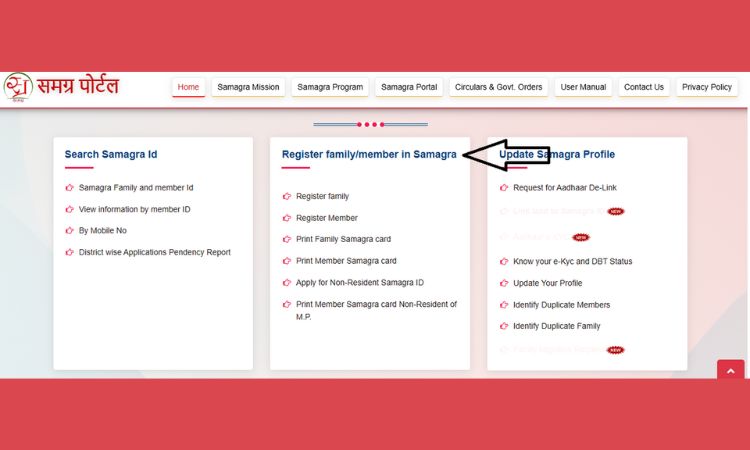
- Go to the official website: samagra.gov.in (or the SPR portal at 164.100.96.12)
- On the homepage, locate the ‘Citizen Services’ section
- Click on ‘Family Registration’ (Parivaar Panjikaran)
- Fill in the Samagra ID Registration Form with your address details, family head information, and upload required documents
- Add each family member one by one using the ‘Add Member’ option
- Double-check all details carefully before submitting
- Submit the form and you will receive a registration confirmation
Online applications are typically processed within 2–3 working days. Offline applications submitted at your local Gram Panchayat or Ward Office may take 7–10 days.
How to Register for Samagra ID Offline?
If you are not comfortable using the internet, you can still register by visiting:
- Your nearest Gram Panchayat office (for rural areas)
- Your local Ward Office (for urban areas)
- A Common Service Centre (CSC/Jan Seva Kendra)
You must have to carry all original documents along with photocopies. The staff there will register your family in the system, and you will receive your Samagra ID within a week.
What Documents Are Required for Samagra ID Registration?
If you want to register on the Samagra Portal MP, then you need to provide some basic documents for identity and address verification.
- Aadhaar card (mandatory for eKYC)
- 10th mark sheet or birth certificate (for date of birth proof)
- Ration card (if available)
- Proof of permanent address in Madhya Pradesh
- Passport-size photograph
- Active mobile number linked to Aadhaar
Samagra eKYC: Why It’s Non-Negotiable in 2026
Now that you have your Samagra ID, here comes the most critical step that most people overlook: completing your eKYC (electronic Know Your Customer verification).
Here’s why this matters more than ever in 2026: Without a completed eKYC, your Samagra ID is essentially inactive for most schemes. It’s like having a bank account but not verifying it. You can have the account, but you can’t withdraw any money.
The MP government ran a special Samagra eKYC campaign from April 1 to May 31, 2025, across all districts. If you missed it, don’t worry; you can still complete it online anytime.
What is Samagra eKYC?
Samagra eKYC is the process of linking your Samagra ID with your Aadhaar card. This Aadhaar-based verification confirms that you are who you say you are. It ensures that government benefits like pensions, scholarships, ration etc. will go directly to the right person’s bank account through DBT (Direct Benefit Transfer).
How to Complete Samagra eKYC Online?
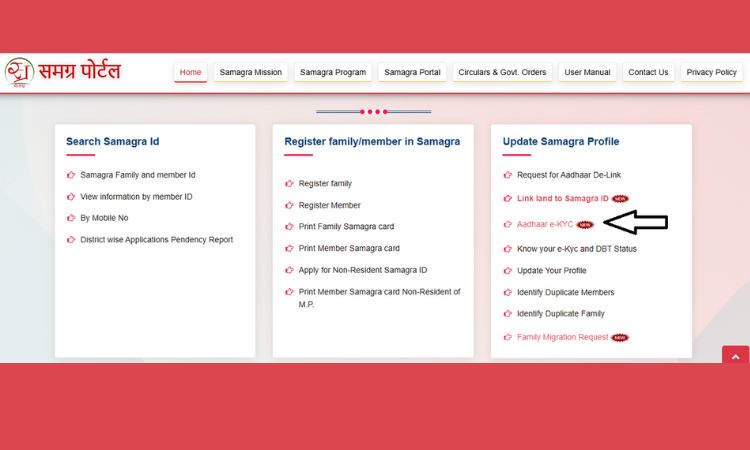
Here are step-by-step guide to complete Samagra Ekyc Online:
- Visit the official Samagra Portal at samagra.gov.in
- Click on the ‘e-KYC’ button on the homepage
- Then enter your 9-digit Member Samagra ID
- After this you have to rnter your 12-digit Aadhaar number
- Keep your Aadhaar-linked mobile phone nearby because you will receive an OTP
- Enter the OTP on the screen
- The system will show your Aadhaar photo and Samagra photo side-by-side for verification
- Confirm the details and click on submit
- After submit, you will get instant confirmation once the eKYC is accepted
The entire process takes less than 5 minutes if your mobile number is linked to your Aadhaar. If it’s not linked, visit your nearest Aadhaar enrollment center first.
What are the Documents Required for Samagra eKYC?
To complete eKYC on the Samagra Portal MP, you only need a few basic documents and details for verification.
- Aadhaar card (12-digit number)
- Member Samagra ID (9-digit number)
- Mobile number linked to Aadhaar (for OTP)
- Address proof (optional)
- Bank details (optional)
How Long Does Samagra eKYC Approval Take?
In most cases, Samagra eKYC verification is instant. However, some profiles may take 2–7 days if a local government officer needs to manually verify your details. You can check your eKYC status by logging into the portal with your Samagra ID.
What Happens If You Don’t Complete eKYC?
This is important: If your eKYC is not completed, the following consequences may apply:
- Pension payments may be blocked or delayed
- Scholarship disbursements may be put on hold
- You may become ineligible for Ladli Behna Yojana payments
- Ration card benefits may be disrupted
- MPTAAS scholarship profile cannot be created without verified eKYC
Note: Do your eKYC as soon as possible. It’s free, it’s fast, and it protects every benefit your family receives.
How to Find Your Samagra ID?
If you are forgot your Samagra ID? Don’t panic. The portal offers multiple ways to retrieve it without visiting any government office.
By Registered Mobile Number
- Go to the official portal
- Click ‘Know Your Family ID’
- Enter your registered mobile number and age group
- Your Samagra ID will be displayed.
By Family Member Name
- Go to samagra.gov.in
- Click ‘Samagra Parivar evam Sadasya ID’
- Select ‘Search by Name’
- Enter your district, local body, name, and gender
- Browse results to find your ID.
By Aadhaar Card
- On the homepage, look for the Aadhaar-based search option
- Enter your 12-digit Aadhaar number
- Your linked Samagra ID will appear.
By Bank Account Number
If your bank account is linked to your Samagra profile, you can use your account number to retrieve your ID through the portal.
Through MP Food Security Portal
- If you don’t have eligibility certificates, visit the MP Food Security Portal
- Select your district and family member details
- Your Samagra ID will be visible.
From School Records
Students from Classes 1–12 surveyed in previous years can find their IDs in the portal’s education database, which was created specifically for scholarship tracking.
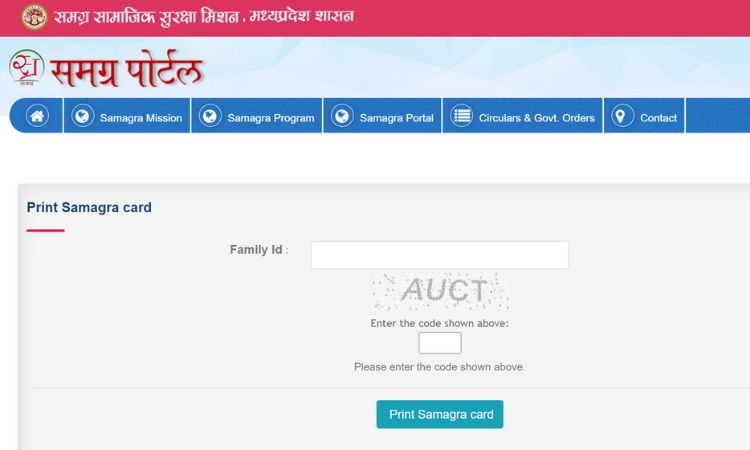
How to Download and Print Your Samagra Card?
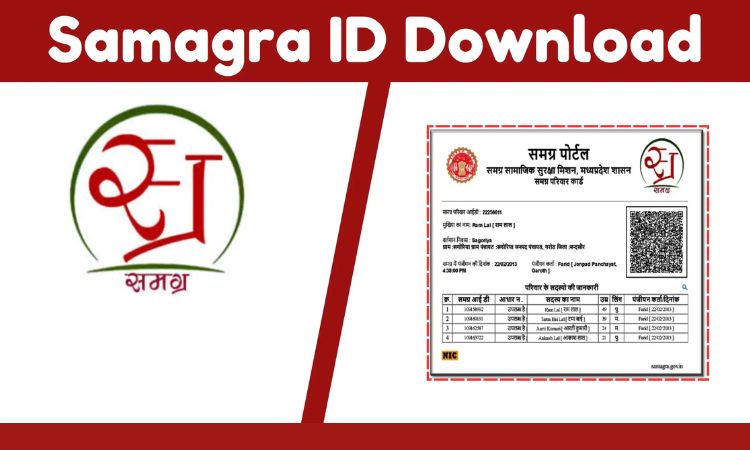
Having a physical or digital copy of your Samagra card is essential. Here’s how to get it:
- Visit samagra.gov.in
- Go to ‘Citizen Services’ section on the homepage
- Click on ‘Print Samagra Card’ or ‘Print Member Card’
- Enter your Samagra ID and the captcha code
- Click ‘View’ — your card details will appear on screen
- Click ‘Print’ or ‘Download as PDF’ to save your card
This printed/downloaded card is valid for all government transactions, school admissions, scholarship applications, and official work across Madhya Pradesh. We strongly recommend saving a digital copy on your phone for easy access.
Government Schemes Linked to Samagra Portal
One of the most powerful aspects of the Samagra Portal is the sheer number of government schemes that are directly linked to your Samagra ID. Here’s a comprehensive overview:
Social Security & Pension Schemes
- Old Age Pension Scheme (Vridhavastha Pension Yojana)
- Widow Pension Scheme (Vidhwa Pension Yojana)
- Disability Pension Scheme (Viklang Pension Yojana)
- CM Labour Security Scheme (Mukhyamantri Shramik Suraksha Yojana)
Women & Family Welfare
- Ladli Behna Yojana (monthly financial assistance for women)
- Maternity benefits under the Prasuti Sahayata Yojana
- Urban Domestic Worker Welfare Scheme
- Chief Minister Handcart and Cycle Rickshaw Driver Scheme
Education & Scholarships
- Post-Matric Scholarship for SC/ST/OBC students via MPTAAS
- Pre-Matric Scholarship schemes
- Samagra Shiksha Portal integration for school-level education tracking
- Attendance monitoring and teacher accountability systems
Food Security & Health
- BPL Ration Card and subsidized food grain distribution
- Ayushman Bharat health insurance (linked via Samagra Plus)
- National Food Security Act (NFSA) benefits
Other Key Benefits
- Fuel subsidies through DBT
- Land record linking through Revenue Maha Abhiyan
- e-Banking of direct benefit transfers
- Insurance schemes for various vulnerable categories
Important: Without a verified (eKYC-complete) Samagra ID, you may be automatically excluded from these schemes during the next verification cycle. Always keep your profile updated.
How to Update Your Samagra Profile?
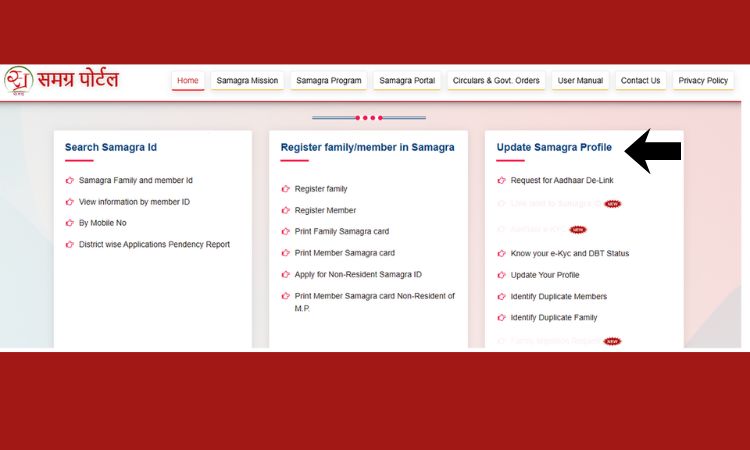
If you want to update your Samagra profile you can do it easily. Life changes people get married, move to new addresses, have children, or need to correct errors in their records.
The Samagra Portal MP allows you to update your profile online. Here’s how:
- Log in to samagra.gov.in with your credentials
- Go to the ‘Samagra Profile Update’ section
- Use the ‘Update/Correction’ option for the details you want to change
- Upload supporting documents (Aadhaar, Birth Certificate, Marriage Certificate, etc.)
- Complete eKYC verification if required for the update
- Submit your request and it will be reviewed and updated within a few days
You can update: your name, date of birth, gender, mobile number, address, and Aadhaar linkage. If you face issues that the online portal cannot resolve, visit your nearest Gram Panchayat office or CSC center for in-person assistance.
Samagra Plus: What It Is and Why It Matters
You may have heard the term ‘Samagra Plus’ recently. This refers to the enhanced set of benefits that become available once your Samagra ID is fully verified through eKYC. Think of it as the premium tier of the Samagra system.
With Samagra Plus, the government can automatically see your family’s needs and deliver the right scheme to you without requiring you to fill out multiple applications for multiple departments. Everything comes through one digital window.
Samagra Plus benefits include health insurance under Ayushman Bharat, ration card services, fuel subsidies, and much more — all delivered directly to your Aadhaar-linked bank account. It’s the future of welfare delivery in Madhya Pradesh.
SPR Samagra Portal: What’s the Difference?
Many users get confused between ‘Samagra Portal’ and ‘SPR Portal.’ Here’s a clear explanation: SPR stands for Samagra Population Register. The SPR Portal is the backend system that hosts all family and individual population records.
For everyday citizens, both terms refer to the same experience managing your Samagra ID, eKYC, and scheme access. The SPR Portal is the technical infrastructure that makes everything work. You access it through samagra.gov.in or the SPR login at the official government URL.
A major municipal corporation in MP adopted the Samagra SPR system for ward-level surveys and saw a dramatic reduction in duplicate records within months. Officers who followed the official user manual for data entry saw much faster case resolution rates.
Samagra Shiksha Portal: Education for Every Child
Parallel to the main Samagra Portal, the Samagra Shiksha Portal MP is a dedicated platform focused on education. From the Smagra Shiksha Portal, the government can track school enrollment, attendance, teacher reporting, and scholarship disbursement across the state.
Before Samagra, paper-based school records and fragmented systems caused delays in benefit delivery and reduced transparency. Today, the Samagra Shiksha Portal connects students, parents, schools, and scholarship records in one unified system.
For students, this means faster scholarship disbursals and smoother admission processes. For teachers, it means less paperwork and more time for actual teaching. For administrators, it means real-time data and better planning.
The portal also supports deeper analytics, helping policymakers identify attendance gaps, learning trends, and financial disbursement patterns across rural and tribal areas not just cities.
Common Problems and How to Solve Them
Problem 1: OTP Not Received During eKYC
Solution: Your mobile number must be linked to your Aadhaar for OTP delivery. If it’s not linked, visit your nearest Aadhaar enrollment center to update your mobile number, then retry eKYC.
Problem 2: Name Mismatch Between Aadhaar and Samagra
Solution: Use the ‘Update Profile’ option on the Samagra Portal to correct your name. Upload supporting documents (birth certificate, school records) and submit for review.
Problem 3: Can’t Find Your Samagra ID
Solution: Try the multiple search options — by mobile number, name, Aadhaar, or bank account. If none work, visit your local Panchayat office for manual verification.
Problem 4: eKYC Status Shows ‘Pending’ for Days
Solution: Some profiles require manual verification by a local officer. If it’s been more than 7 days, visit your nearest Gram Panchayat or Ward Office and raise an IT helpdesk ticket through the portal.
Problem 5: Pension/Scholarship Payment Stopped
Solution: This is almost always due to incomplete or expired eKYC. Log in to your Samagra profile and check your eKYC status. Complete or renew it immediately. Also ensure your bank account details are correctly updated.
Official Contact Channels
- In-Person: Visit your nearest Gram Panchayat or Ward Office for manual assistance
- Online: Raise IT helpdesk tickets through the official Samagra portal’s support section
- CSC Centers: Common Service Centres across MP also provide Samagra-related assistance
Remember: The Samagra Portal is a completely free government service. You never need to pay an agent or middleman. Do everything yourself at samagra.gov.in, or visit your nearest Panchayat office for free assistance.
Conclusion
The Samagra Portal is one of the most impactful digital governance initiatives in India. It has genuinely transformed how social welfare reaches the people who need it most in Madhya Pradesh from tribal families in remote villages to students in urban colleges.
But here’s the honest truth: the portal only works for you if you use it properly. Firstly, you have to register if you have not done it yet and complete your eKYC without delay.
Keep your profile updated when life circumstances change. Download your Samagra card and save it on your phone.
If you have elderly parents or grandparents who find the internet confusing, spend five minutes helping them with their eKYC. It could mean the difference between their pension arriving on time or getting stuck in the system.
In 2026 and beyond, the Samagra ecosystem is only going to get bigger and more integrated with deeper connections to the National Scholarship Portal, Ayushman Bharat, land records, and more.
The earlier you get your Samagra ID verified and your eKYC completed, the smoother your access to all of these benefits will be. Your benefits are waiting. Go claim them.
Related – ULB NDC Haryana Portal
FAQs
Q1. Is the Samagra ID mandatory for everyone in Madhya Pradesh?
No, Samagra ID is not mandatory for everyone in Madhya Pradesh. It is practically essential for almost all government schemes, school admissions, ration cards, scholarship applications, and government job applications in MP. Not having one means missing out on benefits you are rightfully entitled to.
Q2. What is the difference between Samagra ID and Aadhaar?
Aadhaar is a national ID issued by UIDAI to all Indian residents. Samagra ID is a state-level ID specific to Madhya Pradesh residents. They serve different purposes, Aadhaar verifies national identity, while Samagra ID connects you to MP’s state welfare ecosystem
Q3. Can I complete Samagra eKYC from my mobile phone?
Yes, absolutely. The Samagra Portal is mobile-friendly. You just need a stable internet connection and the mobile number linked to your Aadhaar for OTP verification. The entire process can be done in under 5 minutes on any smartphone.
Q4. Is Samagra Portal registration free of charge?
Yes, registration and all services on the Samagra Portal are completely free. The government provides this service at no cost. Beware of middlemen or agents who charge fees, you do not need to pay anyone for this.
Q5. How long does Samagra eKYC approval take?
Most eKYC verifications are instant. In some cases, it may take 2–7 days if a local government officer needs to manually verify your details before the ‘Verified’ status appears.
Q6. What should I do if the portal is down or not working?
The portal occasionally undergoes maintenance. The government typically announces planned downtime in advance. If the portal is down unexpectedly, try again after a few hours or visit your local Gram Panchayat or CSC center for offline assistance.
Q7. Can I add a new family member to my Samagra profile?
Yes. Log in to your Samagra Portal account and use the ‘Add Member’ option. You will need to provide the new member’s Aadhaar details and supporting documents.
Q8. What is Samagra Plus?
Samagra Plus refers to the advanced set of benefits available once your Samagra ID is fully verified through eKYC. It includes health insurance under Ayushman Bharat, ration services, fuel subsidies, and more all delivered automatically through a single digital window.
Q9. Do I need a Samagra ID for MPTAAS scholarship?
Yes. A valid and verified Samagra ID with completed eKYC is mandatory for MPTAAS scholarship applications. The MPTAAS portal uses your Samagra ID to automatically fetch and verify your details for scholarship eligibility.
Q10. How do I check if my eKYC is complete?
You have to log in to samagra.gov.in with your Samagra ID. Check the eKYC status section of your profile. A green checkmark means eKYC is verified. A red mark means it’s pending or rejected and needs attention.