


If you own land or a plot in Rajasthan, you no longer need to visit the Patwari or Tehsil office to see its map.
The Revenue Department of the Government of Rajasthan runs an online portal called bhunaksha.rajasthan.gov.in (Bhu Naksha Rajasthan), where anyone can view, download, and print the map of a piece of land from home.
Now, you don’t need to go to government offices in Rajasthan. In this detailed article, we will learn about Bhu Naksha Rajasthan, how to view land records online through the Bhu Naksha Portal, and more. So, let us start this article.
What Is a Bhu Naksha?
A Bhu Naksha is a digital map of a field, plot, or piece of land. It shows the boundary of the land, the Khasra number, the area, and the details of the surrounding plots.
This map helps confirm exactly where a piece of land is located and where its boundaries lie. In Rajasthan, this record is maintained under the supervision of the Board of Revenue.
Difference Between Bhu Naksha and Jamabandi
Bhu Naksha and Jamabandi are two different things, and most of the people get confused between them.
Bhu Naksha shows the boundary and location of the land on a map, while Jamabandi contains ownership details such as the owner’s name and account (Khata) number. Jamabandi can be checked on a separate Rajasthan government portal called apnakhata.rajasthan.gov.in.
How to View Land Map Online on Bhu Naksha Rajasthan Portal?
If you want to view the land map online on the Rajasthan Bhu Naksha Portal, then follow these simple steps:
Step 1: Open the official Rajasthan government portal bhunaksha.rajasthan.gov.in in your browser.
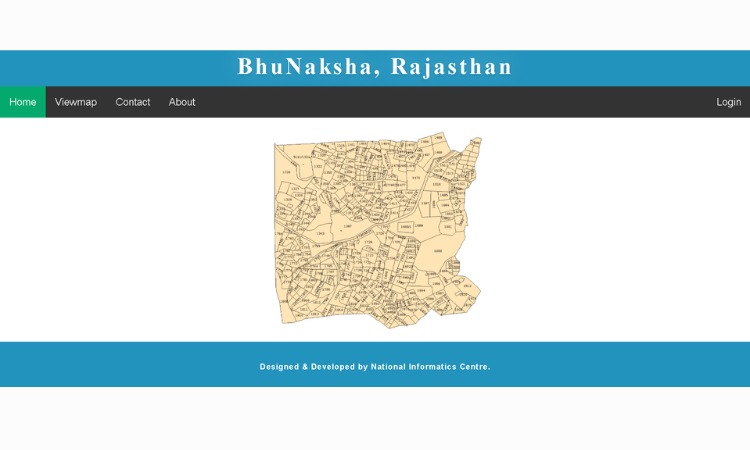
Step 2: On the homepage, click the “View Map” option.
Step 3: Select your District.
Step 4: Next, select your Tehsil.
Step 5: Choose the RI (Revenue Inspector Circle) and Halka.
Step 6: Select the name of your Village.
Step 7: Then, select the Sheet No. (map sheet number), after which the map will appear on the screen.
Step 8: Find your Khasra number among the plots shown on the map and click it, or type the Khasra number directly into the search box at the top.
Step 9: Once you search for the Khasra number, a Plot Info panel opens on the right side, showing details such as the area and the owner’s name.
Step 10: To download or print the map, click the “Nakal” or “Show Report PDF” button in the Plot Info section. This opens a PDF copy of the map.
Rajasthan Districts Available on Bhu Naksha Portal
There are currently 41 districts in Rajasthan, but the Bhu Naksha Rajasthan portal’s digitized land map system is primarily available for the original 33 districts.
| Ajmer | Jalore |
| Alwar | Jhalawar |
| Banswara | Jhunjhunu |
| Baran | Jodhpur |
| Barmer | Karauli |
| Bharatpur | Kota |
| Bhilwara | Nagaur |
| Bikaner | Pali |
| Bundi | Pratapgarh |
| Chittorgarh | Rajsamand |
| Churu | Sawai Madhopur |
| Dausa | Sikar |
| Dholpur | Sirohi |
| Dungarpur | Sri Ganganagar |
| Hanumangarh | Tonk |
| Jaipur | Udaipur |
| Jaisalmer |
How to Find the Map Without a Khasra Number on Bhu Naksha Rajasthan Portal?
If you don’t remember your Khasra number, you can still identify your land by clicking directly on the plots shown on the map or by zooming in. Every plot on the map has its Khasra number written on it, which makes it easier to locate the right piece of land.
Information and Documents You Need on Rajasthan Bhu Naksha
You don’t need any documents to view a Bhu Naksha — the service is completely free and open to everyone. However, keep the following information handy so you can search correctly.
- Correct name of your District, Tehsil, and Village
- Khasra number or plot number (if known)
- A mobile phone or computer with an internet connection
- Any PDF reader app to view the downloaded file
Important Portals Related to Bhu Naksha Rajasthan
| Service | Portal Name | Website |
| View Bhu Naksha (land map) | Bhu Naksha Rajasthan | bhunaksha.rajasthan.gov.in |
| Jamabandi copy (ownership record) | Apna Khata Rajasthan (e-Dharti) | apnakhata.rajasthan.gov.in |
| Mutation (Namantaran) application & status | Revenue Courts Rajasthan | revenuecourts.rajasthan.gov.in |
Legal Validity of the Online Map
Keep in mind that a map downloaded from bhunaksha.rajasthan.gov.in is meant only for information purposes and cannot be used directly as a legal document. If you need the map for legal work such as a bank loan, a court case, or buying or selling land, it must be attested by the Patwari or Tehsil office.
What are the Benefits of Rajasthan Bhu Naksha Portal?
This portal offers various benefits to landowners, farmers, property buyers, and citizens by providing easy access to digital land maps and records online.
- View Land Maps Online – You can check your land map from anywhere without visiting government offices.
- Saves Time and Effort – It saves a lot of time and effort because it accesses land details online in a few clicks. You do not need to visit govt office multiple times.
- Check Exact Plot Boundaries – View accurate land boundaries and neighboring plots to avoid confusion.
- Reduces Land Disputes – Clear digital maps help resolve boundary-related disputes and ownership issues.
- Useful for Property Buyers – If you are a property buyer, you can easily verify plot location, dimensions, and ownership details before purchasing land.
- Improves Transparency – The major benefit of Rajasthan Bhu Naksha is that it brings more transparency. Now, all the land details are present online, and it is easily accessible, reducing the chances of fraud.
- Available 24/7 – Citizens can access this portal anytime by using a computer or mobile device.
- Integrated with Land Records – Bhu Naksha is linked with Jamabandi, Khasra, and other land record information for easy verification.
- Helps in Loan Applications – Banks may require land details and maps during agricultural or property loan processing.
- Easy Verification of Land Ownership – Users can cross-check ownership and land details before legal transactions.
- Download and Print Maps – You can easily view the Land maps, and from there you can download and print them for future reference.
- Supports Farmers – Farmers can easily access field maps and land information required for various government schemes and agricultural purposes.
- GIS-Based Mapping System – The portal uses digital mapping technology to provide accurate land parcel information.
- Reduces Dependence on Middlemen – Citizens can obtain land information directly from the official portal.
Also Read – MP Bhulekh
Common Problems While Checking the Map and How to Fix Them
Map Is Not Loading
If the website is slow or the map is not loading, wait a while and try again, or switch to a different browser. This usually happens when the server is under heavy traffic.
Khasra Number Not Found
If searching the Khasra number gives no result, recheck your selection of District, Tehsil, RI, Halka, and Village, since choosing the wrong village will not return the correct Khasra number.
Printout Is Not Coming Out Properly
Printing directly from a mobile phone often causes page formatting issues. For official use, it’s better to print using a computer and a proper PDF reader.
Conclusion
Overall, the Bhu Naksha Rajasthan portal has made it much easier to access land-related information. Now any citizen can view their land map, check its boundaries, and download a PDF copy from anywhere and anytime.
You do not need to visit any government office. Rajasthan Bhu Naksha makes land record verification simple, transparent, and convenient. Also, this portal helps citizens by saving their time, reducing disputes, and making informed property decisions.
However, for legal purposes, always get the map attested by the concerned revenue officer to avoid problems later.
Also Read – Bhu Naksha UP
Frequently Asked Questions
Q1. Which website is used to view Bhu Naksha Rajasthan?
The official website to view Bhu Naksha Rajasthan is bhunaksha.rajasthan.gov.in.
Q2. Is there any fee to view the Bhu Naksha Rajasthan online?
No, viewing and downloading the Bhu Naksha online is completely free.
Q3. Is a map downloaded online legally valid?
A map downloaded online is valid only for information purposes. For legal work, it must be attested by the Patwari or Tehsil office.
Q4. How do I find my Khasra number?
The Khasra number is recorded in the Jamabandi copy or older land documents, and it can also be checked through the Apna Khata Rajasthan portal.
Q5. Can the Bhu Naksha be downloaded from a mobile phone?
Yes, the Bhu Naksha can be viewed and downloaded as a PDF directly from a mobile browser.
Q6. How can I see all plots owned by the same person?
After opening a plot on the map, click the “Same Owner Nakal” option to view all plots registered under the same owner.