





If you own land in Rajasthan, or you are planning to buy a plot, checking the land record is one of the first things you should do.
Earlier, you had to visit the tehsil office, stand in a queue, and ask the patwari for a copy of your land papers. That process took days and sometimes weeks.
Today, this work can be done from your phone or computer. The Rajasthan government runs an online portal called Apna Khata, also known as e-Dharti, where anyone can check land ownership details, view the Jamabandi, download the Khasra map, and even apply for a name change in the records.
In this detailed article, we will know everything about the Apna Khata Rajasthan portal, how to check land records and apply for Mutation online on the Apna Khata portal, its benefits and more. So, let us start this blog.
Apna Khata Rajasthan Quick Overview
| Particulars | Details |
| Portal Name | Apna Khata Rajasthan |
| Official Website | https://apnakhata.rajasthan.gov.in/ |
| State | Rajasthan |
| Managed By | Revenue Department, Government of Rajasthan |
| Launched By | Government of Rajasthan |
| Objective | To digitize land records and provide online access to land-related services |
| Main Services | Jamabandi Nakal, Khasra Copy, Khatauni Copy, Mutation Services |
| Land Record Access | District, Tehsil, Village, and Khasra-wise search |
| User Benefits | Quick, transparent, and paperless access to land records |
| Service Availability | 24×7 Online |
| Application Fee | As per Rajasthan Revenue Department norms |
| Contact Office | Revenue Board Rajasthan |
| Address | Todarmal Road, Civil Lines, Ajmer, Rajasthan |
| Beneficiaries | Landowners, farmers, property buyers, and citizens of Rajasthan |
| Mode of Access | Online Portal |
What Is Apna Khata Rajasthan?
Apna Khata is the official online land record portal run by the Revenue Department, Government of Rajasthan. The website address is apnakhata.rajasthan.gov.in (also reachable at apnakhata.raj.nic.in). It is sometimes called e-Dharti or e-Bhumi as well.
This portal was started under the Digital India Land Records Modernisation Programme, a central government scheme to convert paper-based land records into digital form across the country.
In Rajasthan, the result of this scheme is the Apna Khata website, where land records of villages and towns across the state have been put online.
In simple words, Apna Khata is like a digital file room for land records. Instead of visiting a government office and asking someone to pull out your file, you can search for your own record on the website and see it on your screen within seconds.
What you can do on Apna Khata Rajasthan Portal?
You can see and check multiple things on apnakhata.rajasthan.gov.in, like:
- You can view and download Jamabandi (record of rights)
- Check Khasra and Khatauni details
- You can see the land map through Bhu Naksha
- Apply for mutation (Namantaran) when land ownership changes
- You can also track the status of an application you have already submitted
Why Checking Land Records Online Matters?
Land disputes are common in many parts of India, and Rajasthan is no exception. A large number of these disputes happen simply because the buyer did not check the land record properly before making a payment. The Apna Khata portal helps reduce this risk in a few clear ways.
- It removes the need to depend on a middleman or agent for basic information about land ownership.
- It lets a buyer confirm the seller’s name matches the name on the official record before any money changes hands.
- It reduces manual errors that used to creep into paper registers, since the data is now typed and stored digitally.
- It saves time, since records that once took days to obtain from the tehsil office are now available instantly online.
- It supports loan applications, since banks usually ask for a recent Jamabandi copy before approving a loan against land.
Because of these reasons, real estate agents, lawyers, farmers, and even banks now refer to this portal regularly.
How to Check Land Records on Apna Khata Rajasthan?
Checking your land record on the Rajasthan land record portal is a straightforward process. Here are the steps you need to follow.
Step 1. Firstly, you have to visit the official website to check the Rajasthan land record at apnakhata.rajasthan.gov.in.
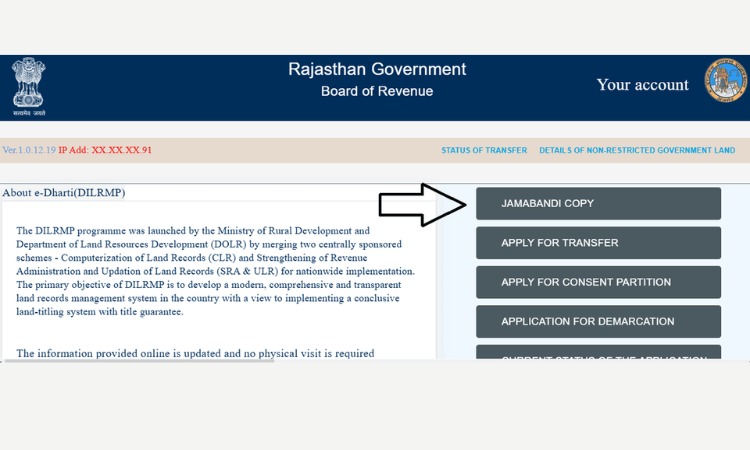
Step 2. On the homepage, you will see a map of Rajasthan divided by district. Click on your district name.
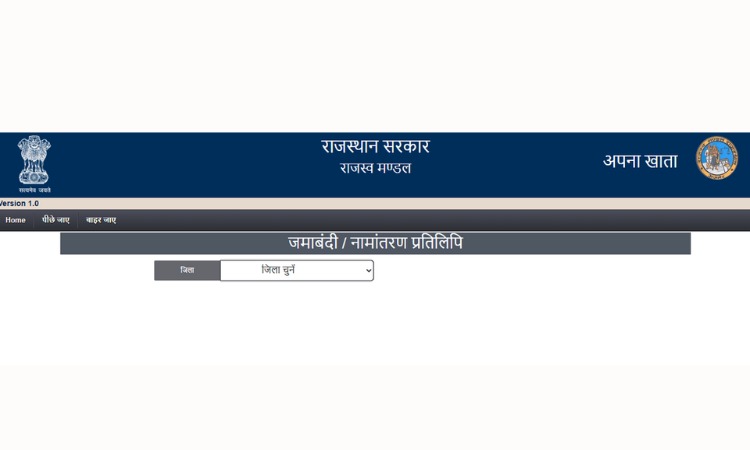
Step 3. After selecting the district, choose your tehsil from the list given on the Apna Khata Rajasthan portal.
Step 4. Next, select your village name from the dropdown menu.
Step 5. Choose the Jamabandi year for which you want to see the record. Usually, the current or most recent year is selected by default.
Step 6. Now pick a search option. You can search using the Khata number, Khasra number, owner’s name, USN (Unique Survey Number), or GRN (Government Reference Number), depending on what information you already have.
Step 7. Enter the required detail in the box and click on Submit or Search.
Step 2. The land record will appear on your screen. It will show the owner’s name, father’s or husband’s name, Khata number, Khasra number, total area, and type of land.
Step 8. If you want a copy for your own reference, choose the ‘Nakal Suchnarth’ (informational copy) option. If you need an official copy with a digital signature for legal or bank purposes, choose the ‘e-hastakshrit’ (e-signed) copy option, which usually involves a small fee.
This same process works whether you are checking your own land or verifying someone else’s land before a purchase.
Also Read – MP Bhulekh
Fees for Land Record Copies on Apna Khata Rajasthan
Most basic searches on the Apna Khata Rajasthan portal are free. You only pay a small fee if you want an official, digitally signed copy of the record that can be used for legal or banking purposes.
| Type of Copy | Approximate Fee |
| Jamabandi copy (informational) | Free to view |
| Jamabandi copy (e-signed, official) | Around ₹10 |
| Map or nomination copy | Around ₹20 |
| Mutation application fee | Around ₹30 |
These amounts are approximate and may change over time, so it is always good to check the current fee on the portal or at your nearest e-Mitra kiosk before making a payment.
How to Apply for Mutation (Namantaran) Online on Apna Khata Rajasthan?
If you have recently bought land, received it as a gift, or inherited it after a death in the family, the next step after registration is to apply for mutation.
This updates the land record to show your name instead of the previous owner’s name. Without this step, you may face problems later, such as being unable to pay land tax or get a loan against the property.
Step 1: Visit apnakhata.rajasthan.gov.in and look for the option to apply for mutation, usually labelled ‘Namantaran Ke Liye Apply Karein.’
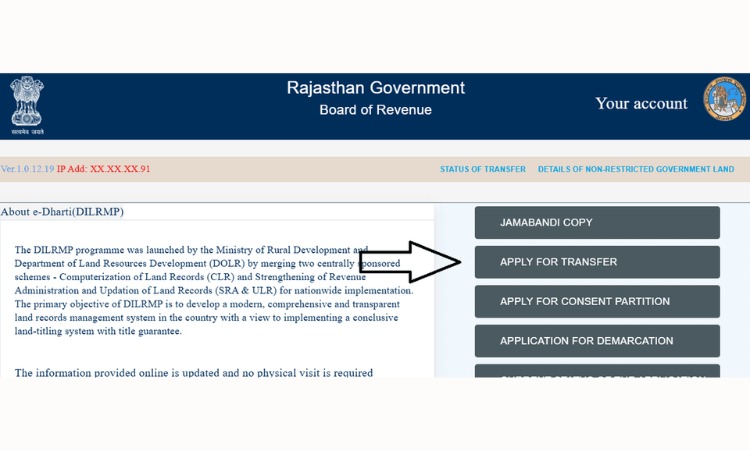
Step 2: Fill in the applicant’s name, father’s name, address, district, village, and the property details such as Khata number and Khasra number.
Step 3: Upload the required documents, which usually include the sale deed, Aadhaar card, PAN card, the existing Jamabandi copy, and a death certificate or succession certificate in case of inheritance.
Step 4: Pay the mutation fee online through the portal, or visit a nearby e-Mitra kiosk if you are unable to pay digitally.
Step 5: Submit the application and note down the mutation number or token number that is generated.
The application then goes to the Patwari and Tehsildar for verification. Once approved, you will get an SMS confirming that the mutation has been completed. It usually takes around 30 to 60 days if the documents are in order and there is no dispute over the land.
Documents Generally Required for Mutation
- Aadhaar card
- PAN card
- Registered sale deed, gift deed, or will, depending on how the land was transferred
- Existing Jamabandi copy of the land
- Khasra map or Bhu Naksha copy
- Death certificate and legal heir or succession certificate, only in case of inheritance
- No Objection Certificate (NOC), if applicable in your area
How to Track Mutation or Application Status on Apna Khata Rajasthan Portal?
After applying for mutation or any other service on Apna Khata, you can check its progress directly on the portal.
Step 1: Go to the Apna Khata website and find the ‘Namantaran Ki Sthiti’ or Mutation Status section.
Step 2: Select your district, tehsil, and village.
Step 3: Enter your application number or mutation number, which you received at the time of submitting the request.
Step 4: The screen will show whether your application is pending, under verification, approved, or rejected.
This tracking feature is useful because it removes the need to call or visit the tehsil office just to ask about the progress of your file.
Important Land Record Terms You Should Know
Before you start using the portal, it helps to understand a few terms that appear again and again on Apna Khata. These words can feel confusing at first, but they are simple once explained.
Jamabandi
It is also called the Record of Rights, or RoR. Jamabandi tells you who owns a particular piece of land, how much area it covers, and what type of land it is, such as agricultural or non-agricultural. When people say they want to check their ‘land record,’ they usually mean checking the Jamabandi.
Khasra Number
A Khasra number is like an ID number given to a single plot of land in a village. Every separate piece of land has its own Khasra number, similar to how every house has its own address.
Khata Number
A Khata number is different from a Khasra number. While Khasra refers to one plot, Khata refers to the account of a person or family, which may include several plots together. So, one Khata number can be linked to multiple Khasra numbers if a family owns more than one piece of land.
Khatauni
Khatauni is a record that shows tenancy and cultivation details linked to a Khata. It often appears alongside Jamabandi when you search for a record.
Mutation (Namantaran)
Mutation is known as Namantaran in Hindi. It is the process of updating the owner’s name in government land records after a sale, inheritance, or gift.
Buying land does not complete the transfer on its own; the mutation step is what actually changes the official record to show the new owner’s name.
Difference Between Apna Khata Rajasthan Online Jamabandi and Certified Jamabandi
Many people get confused between Online Jamabandi and Certified Jamabandi. Let’s see the difference between them.
| Online Jamabandi | Certified Jamabandi |
| It is digital copy of land records available on the Apna Khata Rajasthan portal | It is an officially verified copy issued by the Revenue Department |
| You can download it online anytime | It is obtained from the concerned Revenue Office or authorized center |
| It does not contain an official seal or signature | It contains official verification, seal, and certification |
| Online Jamabandi has limited acceptance | It is widely accepted for legal and government purposes |
| Available 24/7 online | Requires an official application or request |
Apna Khata Mobile App
For people who find it easier to use a phone than a computer, the National Informatics Centre (NIC) has released an official mobile application for Apna Khata on the Google Play Store.
NIC is the central government technical agency that also manages the backend of the website, so the app pulls the same data as the official portal.
Through the app, you can search land records, check Khasra and Khata details, and track mutation applications, all from your smartphone, without needing to open a browser.
Benefits of Apna Khata Rajasthan Land Records
- It saves a lot of time, since records that once required a visit to the tehsil office are now available within minutes.
- It increases transparency, because now buyers can independently confirm land ownership before making any payment.
- Reduces fraud, because fake documents are harder to pass off when the real record is just a search away.
- Supports legal and banking work, since e-signed copies of Jamabandi are accepted for loans, registry, and inheritance claims.
- Helps farmers by giving them an easy way to check Girdawari (crop record) details linked to their land.
- Useful for NRIs, who can verify family land in Rajasthan from anywhere in the world without needing someone to visit the tehsil office on their behalf.
Practical Tips Before You Buy or Sell Land
Checking the Jamabandi is necessary, but it is not the only step you should take before a property deal. Here are a few practical points worth keeping in mind.
- Always check the Jamabandi for the latest available year, since older copies may not reflect a recent ownership change.
- Cross-check the Khasra number on the Jamabandi with the Khasra number shown on the Bhu Naksha map, to make sure both refer to the same plot.
- If you are buying land, confirm that any earlier mutation related to the seller has already been completed and approved, not just applied for.
- Keep a printed or digitally signed copy of the Jamabandi safely, since banks and registration offices often ask for it.
- If you notice an error in your record, such as a wrong name or incorrect area, apply for a correction (Shuddhipatra) through the portal or at your local tehsil office rather than ignoring it.
Conclusion
Overall, the Apna Khata Rajasthan portal has made a noticeable difference in how people deal with land records in Rajasthan.
Earlier, citizens of Rajasthan had to visit the tehsil office multiple times, but now everything can be done from a phone within a few minutes.
On the Rajasthan Land Records portal, you can easily check Jamabandi, Khasra, Khatauni details, apply for mutation, or verify land ownership. This portal provides quick and transparent access to important land-related information.
If you want to buy a property or own land in Rajasthan, then Apna Khata Rajasthan is a good platform for you.
Also Read – Bhu Naksha UP
Frequently Asked Questions
Q1. What is Apna Khata Rajasthan?
Ans. Apna Khata is the official online land record portal of the Rajasthan government. It is also called e-Dharti, and it lets people check Jamabandi, Khasra, Khatauni, and mutation details for land located anywhere in the state.
Q2. What is the official website address of Apna Khata Rajasthan?
The portal can be accessed at apnakhata.rajasthan.gov.in, which is also reachable through apnakhata.raj.nic.in.
Q3. Is checking land records on Apna Khata free?
Yes, viewing a basic informational copy of your land record is free. You only need to pay a small fee, usually around ₹10 to ₹20, if you want an official, digitally signed copy.
Q4. What is the difference between Khata number and Khasra number?
A Khata number is the account number linked to a person or family, which may cover several plots of land. A Khasra number is the identification number given to one single plot. One Khata can include multiple Khasra numbers.
Q5. How long does mutation take in Rajasthan?
Mutation, or Namantaran, generally takes around 30 to 60 days, provided all required documents are submitted correctly and there is no ongoing dispute over the land.
Q6. What is the difference between Apna Khata and Bhu Naksha?
Apna Khata shows written ownership records such as Jamabandi and Khasra details. Bhu Naksha shows the visual map of the plot, including its shape, size, and boundary. Many people use both together before finalising a land deal.
Q7. Is there a mobile app for Apna Khata?
Yes, there is an official Apna Khata app is available on the Google Play Store. It is developed and maintained by the National Informatics Centre (NIC).