






If you own land in Bihar or you are planning to buy land in Bihar, you need to check the land records first.
Land disputes are common when ownership papers are not clear. The Bihar government has solved this problem with an online portal called Bihar Bhulekh and it is also known as Bihar Bhumi.
On this portal, you can easily check your Khata number, Khasra number, Jamabandi, and land map (Bhu Naksha) from your phone or computer.
You do not need to visit the revenue office for basic checks. You can also pay land tax, apply for mutation, and correct errors in your land record online.
In this detailed article, we will learn about the Bihar Bhulekh Portal, how to check land records online, khasra Khatauni, Bhu Naksha, and more on Bhulekh Bihar. So, let us start this blog.
What Is Bhulekh Bihar?
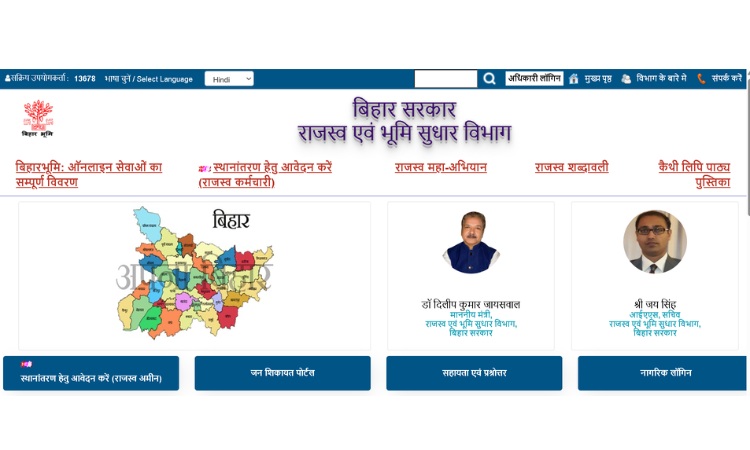
Bhulekh Bihar is also called Bihar Bhumi. It is the official online portal of the Bihar government for land records. This portal is run by the Department of Revenue and Land Reforms, Government of Bihar.
On this portal, any person can check the land details from home, without going to a government office.
The word “Bhulekh” means land record in Hindi. On this portal, a landowner or buyer can see the Khata number, Khasra number, Jamabandi (Record of Rights), and Bhu Naksha (land map) of any plot in Bihar.
The portal also allows online land tax (lagaan) payment, mutation (Dakhil Kharij) applications, and correction of errors in old land records.
This system is part of the Digital India programme. Before this portal started, people had to visit the local revenue office (Anchal office) many times to get a copy of their land record. Now this same information is available online in a few minutes.
Why Bihar Bhulekh Is Important?
Land records prove who owns a piece of land. These records are needed when a person buys land, sells land, takes a home loan, or applies for a government scheme.
If the land record is not clear, it can lead to disputes between family members or neighbours.
The Bhulekh Bihar portal solves several common problems:
- It removes the need to visit the revenue office for every small check.
- It reduces fraud because buyers can verify ownership before paying money.
- It gives a written, official copy of land details that can be used in courts and banks.
- It helps people pay land tax online instead of standing in a queue.
- Bihar Bhulekh Portal allows people to track the status of mutation and other applications.
Important Terms Used on Bihar Bhumi Portal
Before checking land records, it helps to know a few common terms used on the portal. These words appear again and again on Bhulekh Bihar.
- Khata Number: A unique number given to a group of plots owned by one person or family in a village.
- Khasra/Khesra Number: A unique number given to a single plot of land. Every plot in a village has its own Khasra number.
- Jamabandi (Register-II): The official record that shows who owns the land, how much land tax is due, and other ownership details. It is also called Record of Rights (RoR).
- Khatiyan: An old land survey record that lists ownership and the type of land. It is the base document from which the Jamabandi is prepared.
- Bhu Naksha: It is a digital land map that shows the shape, size, and boundary of a plot.
- Dakhil Kharij (Mutation): The process of updating land records after a sale, gift, or inheritance, so the new owner’s name appears in the Jamabandi.
- Bhu Lagaan: Land tax that landowners pay to the state government every year.
- Parimarjan: An online request to correct mistakes in land records, such as a wrong name or a wrong area.
- LPC (Land Possession Certificate): It is a certificate that confirms a person is in possession of a particular piece of land. It is often needed for loans.
- MVR (Minimum Value Register): A list that shows the minimum government rate of land in a particular area, used to calculate stamp duty.
How to Check Bihar Land Records Online (Apna Khata / Jamabandi)?
To check land ownership records, also called Apna Khata, follow these steps on the Bihar Bhumi portal.
Step 1: Firstly, you have to open the official Bihar Bhumi website: biharbhumi.bihar.gov.in
Step 2: On the home page, click on “Jamabandi Panji Dekhen” (View Jamabandi Register).
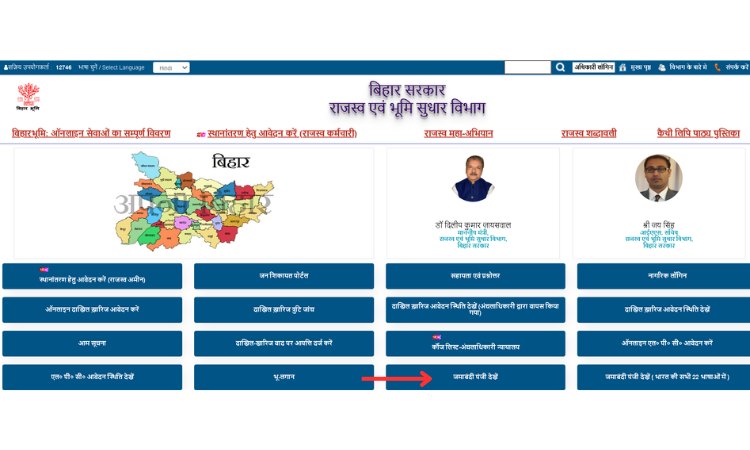
Step 3: Then select your district from the list.
Step 4: Select your Anchal (Circle).
Step 5: Click on “Proceed” to move to the next step.
Step 6: Select your Halka (a smaller revenue unit inside the circle).
Step 7: After this, select your Mauza (village name).
Step 8: Choose a search option. The portal allows search by Khata number, Khasra number, owner’s name (Raiyat name), and a few other options.
Step 9: Enter the number or name you have chosen, and click “Search.” The Jamabandi record will appear on the screen, with owner details, Khata-Khasra information, and land area.
Step 10: Use the print or download icon to save a copy for your records.
Note: The names of the steps and buttons (such as “Halka” or “Mauza”) may appear in Hindi on the portal. Most pages also have an English option.
Also Read – MP Bhulekh
How to Check Khasra-Khatauni Online on Bihar Bhumi Portal?
You can easily check Khasra-Khatauni details online on the Bihar Bhulekh Portal. Khasra-Khatauni gives plot-level details, such as land type, area, and the names of all owners linked to a Khata. Here is how to check it:
Step 1: Visit the Bhulekh Bihar portal.
Step 2: Go to “Online Services” and click on “Khasra-Khatauni.”
Step 3: Select the district, sub-division, circle, and village (Mauza) of the land.
Step 4: Search using the Khasra number, Khata number, or owner’s name.
Step 5: Click “Search” or “Submit.” The Khasra-Khatauni details will be shown on the screen, which you can view, print, or download.
How to Check Bhu Naksha Online on Bihar Bhu Naksha?
Bhu Naksha is the digital map of land plots. It is useful for checking the exact shape, size, and location of a plot before buying it.
Step 1: Go to the Bhu Naksha Bihar portal: bhunaksha.bihar.gov.in
Step 2: Select your district from the map shown on the screen.
Step 3: Select your sub-division, circle, and village.
Step 4: Select the Khasra number of the plot from the map or the list.
Step 5: The map of the plot will open, and you will also see plot details on the right side.
Step 6: Click on the option to download or print the map for your reference.
Also Read – Apna Khata Rajasthan
How to Apply for Mutation (Dakhil Kharij) on @biharbhumi.bihar.gov.in?
Mutation is needed whenever land changes hands, for example, after a sale, gift, partition, or inheritance. Without mutation, the old owner’s name stays in government records, which can cause problems later.
Step 1: You have to visit biharbhumi.bihar.gov.in
Step 2: Click on “Apply Online for Mutation” (Online Dakhil Kharij Application).
Step 3: New users must register first with basic details such as name, mobile number, email, and address. Existing users can log in directly.
Step 4: After login, select your circle and district.
Step 5: Click on “Apply New Mutation” and choose the mutation type, such as sale, gift, or inheritance.
Step 6: Fill in the land details and upload the required documents, such as the sale deed.
Step 7: Submit the form. A receipt with an application number will be generated.
Step 8: Use this application number to track the mutation status later under “Mutation Status” on the same portal.
Step 9: After submission, the local revenue officer reviews the application and supporting documents. If everything is correct, the mutation is approved, and the Jamabandi is updated with the new owner’s name.
Whats are the Documents Needed for Mutation and Other Services?
The exact list of documents can change depending on the service, but these are commonly asked for:
- Identity proof, such as Aadhaar card or voter ID
- Sale deed or registered property document
- Previous Jamabandi or Khatiyan copy, if available
- Land tax receipt (latest Bhu Lagaan receipt)
- Death certificate and legal heir certificate, in case of inheritance
- Passport-size photograph, in some cases
How to Pay Land Tax (Bhu Lagaan) Online on Bihar Bhulekh Portal?
You can easily pay land tax online through the Bihar Bhumi Portal. Just follow these simple steps:
Step 1: Log in to the Bihar Bhumi portal.
Step 2: Go to the “Pay Online Lagaan” section.
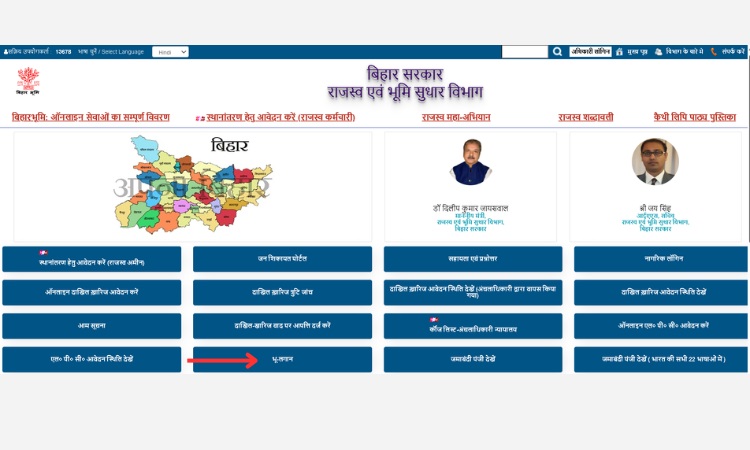
Step 3: Select your district, circle, and village.
Step 4: Search your land using the Khata number or owner name.
Step 5: Check the tax amount shown for your land.
Step 6: Choose a payment method and complete the payment.
Step 7: Download or print the payment receipt for your records.
How to Check LPC (Land Possession Certificate) Status on Bihar Bhulekh Portal?
LPC is often needed for bank loans, as proof that a person holds possession of the land. To apply or check status:
Step 1: Visit the Bihar Bhumi portal and log in.
Step 2: Select “Jamabandi Selection for LPC.”
Step 3: Search your Jamabandi record using the available options, such as Khata number or owner name.
Step 4: Select your record from the list shown and fill in the LPC application form.
Step 5: Submit the form to get an application number.
Step 6: Use this number on the “LPC Application Status” page to track progress.
How to Correct Errors in Land Records (Parimarjan) on Bihar Bhumi Portal?
Sometimes land records have small mistakes, such as a spelling error in the owner’s name or a wrong land area. There is an option called Parimarjan service on the Bihar Bhulekh Portal, from where landowners can apply for online correction.
Step 1: Go to the Bihar Bhumi portal and click on “Parimarjan.”
Step 2: If you are a first-time user, you have to register. An already registered person can directly log in.
Step 3: Select the type of correction needed and fill in the correct details.
Step 4: Upload supporting documents that prove the correct information.
Step 5: Submit the application. An application ID will be generated.
Step 6: Track the status of the correction request using this application ID.
Note: The Revenue Department may ask for more documents before approving the correction. It is good practice to keep all original land papers safe, since they may be needed at this stage.
How to Search Land Records by Serial Number (Bhumi Jankari) on Bihar Land Record Portal?
Apart from Bihar Bhumi, the Bhumi Jankari portal allows search by serial number or party (owner) name.
Step 1: Visit bhumijankari.bihar.gov.in
Step 2: Click on “Searching by Serial No.” on the right side of the page.
Step 3: Choose “Post-Computerisation” for records from 2006 onward, or “Pre-Computerisation” for older records.
Step 4: Enter the required district, circle, and serial number details.
Step 5: View, print, or download the record shown on the screen.
What are the Benefits of Checking Land Records Online?
- The major benefit of this portal is that it saves a lot of time. There is no need to visit government offices repeatedly.
- It reduces the chance of fraud during land purchase, since ownership can be checked before payment.
- You can easily access land records from anywhere, at any time.
- Helps in faster loan approval, since banks often ask for Jamabandi and LPC copies.
- Makes the mutation and tax payment process faster and easier to track.
- Improves transparency and lowers the scope for land-related disputes.
Common Problems and Simple Solutions on Bihar Bhulekh Portal
- Record not found: Double-check the spelling of the village name and try searching by a different option, such as Khata number instead of owner name. Old records may also be listed under a slightly different spelling.
- Website is slow or not loading: Government portals can get heavy traffic, especially during office hours. Try again later in the day or early morning.
- Name spelling is wrong in the record: Use the Parimarjan service to apply for a correction with supporting documents.
- Mutation application rejected: Check the rejection reason shown on the status page, and resubmit with the correct or missing documents.
- Land map (Bhu Naksha) not matching the actual plot: This can happen due to old survey errors. In such cases, a visit to the local revenue office along with the Parimarjan application is usually needed.
Conclusion
Overall, Bhulekh Bihar has made it much easier for landowners, buyers, and sellers. Now they can easily access land information without visiting government offices again and again.
On this portal, you can easily check your Jamabandi, view your land map, pay land tax, or apply for mutation, and all the entire process can now be completed online.
If you are buying or selling any land, it is a good practice to check the latest Khata, Khasra, and Jamabandi details on Bihar Bhumi Land Records. This simple step can save time, money, and legal trouble in the future.
Also Read – Bhu Naksha UP
Frequently Asked Questions
Q1. What is Bhulekh Bihar?
Bhulekh Bihar is the official online portal of the Bihar government where people can check land records such as Khata, Khasra, Jamabandi, and Bhu Naksha.
Q2. Is checking land records on Bihar Bhumi free?
Yes, viewing land records online is free. Some services, like land tax payment or certified copies, may involve a government fee.
Q3. What is the official website for Bihar land records?
The main website is biharbhumi.bihar.gov.in. The land map portal is bhunaksha.bihar.gov.in, and the advanced search portal is bhumijankari.bihar.gov.in.
Q4. How can I find my Khata or Khasra number?
You can search by your name (Raiyat name) on the Jamabandi Panji page, and the matching Khata and Khasra numbers will be shown along with the land record.
Q5. How long does mutation (Dakhil Kharij) take in Bihar?
The time can vary by district and case complexity. It usually takes a few weeks if all documents are correct and complete. Applicants can track progress using the application number.
Q6. Can I download a copy of my Jamabandi online?
Yes, after searching your record on the Jamabandi Panji page, you can use the print or download option to save a copy.
Q7. What should I do if my land record shows a wrong owner name?
Apply for a correction using the Parimarjan service on the Bihar Bhumi portal, along with documents that support the correct name.
Q8. Is the Bhulekh Bihar record valid as legal proof of ownership?
Jamabandi is an official revenue record and is widely accepted as supporting evidence of ownership, but for major transactions, it is best to also rely on the registered sale deed and consult a lawyer if needed.